Is It Safe to Use AI for Your Taxes?
Not without care: a tax document bundles your tax ID, income and address — pasting it raw into AI risks identity theft. What actually protects you.
No — not without care: handing a raw tax document to a consumer AI isn't safe. A tax document gathers your most sensitive identifiers in one place — a tax ID or Social Security number, income amounts, your home address, sometimes dependents. Pasting that block into ChatGPT, Claude or Gemini exposes it to retention, to possible human review, and to tax identity theft if it ever leaks. The good news: AI can help you with tax concepts without ever seeing those identifiers. You just anonymize them before sending.
Why a tax document is a prime target
A tax return or assessment gathers exactly what fraudsters look for: a tax ID number or a Social Security number (SSN in the US), your income, your home address, your employer's identifier, and sometimes information about dependents. No other everyday document bundles so many usable identifiers. Pasting it as-is into an AI exposes all of those at once — precisely the concentration that makes a leak dangerous.
What the tax authority and chatbots actually say
The IRS has listed AI abuse in its “Dirty Dozen” of tax scams: AI is cited both for impersonating the tax authority (robocalls, voice cloning, spoofed caller ID) and for harvesting taxpayer information, later reused to produce highly convincing fake returns. The IRS also advises against relying on AI-generated answers for complex tax questions and recommends verifying any calculation it provides: an AI can “sound right” while being wrong, especially when rules change. On the tools side, most consumer chatbots — including ChatGPT — reserve the right to retain or use inputs to improve their systems: your entry can be kept, and potentially reviewed.
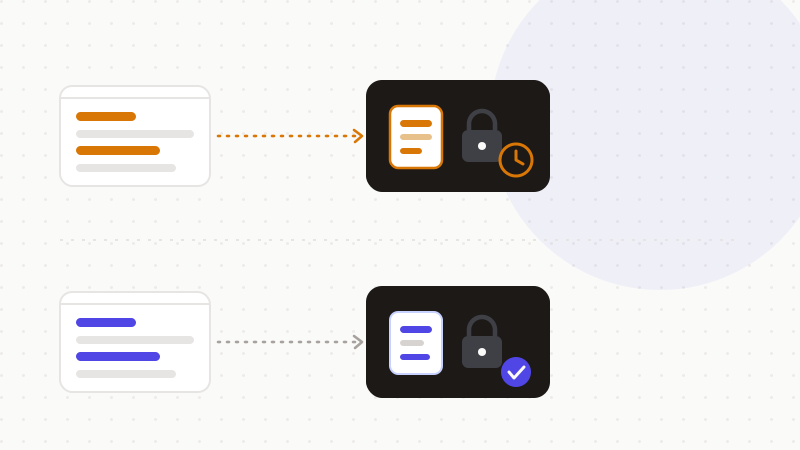
What you think you're doing — and what you actually do
| You assume | The reality |
|---|---|
| “I delete the chat, it's erased” | The input can be retained and potentially reviewed |
| “No one wants my tax ID number” | It's the key identifier for tax identity theft |
| “AI does my taxes better than I do” | The IRS advises verifying any AI-provided calculation |
| “I have to upload the document” | You can summarize your situation with no identifier |
The fix: anonymize before sending
The converging security advice from the specialist press is one rule: don't upload raw tax documents. Summarize your situation rather than uploading the document; and if you do upload, first redact Social Security numbers, account numbers, employer identifiers and addresses — treat the input as if you were posting it on a public forum. You can also turn on the platforms' safeguards:
- Check whether the platform trains its models on customer data and opt out in the settings.
- Turn off chat history.
- Delete uploaded documents after use.
These settings help, but they stay imperfect: none replaces never sending the identifier in the clear. The safe sequence comes down to a few steps:
- 1Spot the sensitive identifiers: tax ID or SSN, named amounts, address, employer, dependents.
- 2Replace them with reversible tokens before sending — never a tax ID in the clear.
- 3Ask the AI your question on the anonymized text.
- 4Restore the real values in your browser, on the answer you get back.
Worth keeping in mind, and it's honest: AI stays useful for general tax tasks without your identifiers — explaining a concept, summarizing a new rule, structuring a question. The usefulness never requires pasting a tax ID, a named income or an address. For finance at large, the same principle applies: see our article on the privacy of financial data in AI.
That's exactly what ONYRI Sanitize is for: the engine spots tax ID, SSN, amounts and address, and replaces them with reversible tokens before sending. Detection and the token↔value mapping stay in your browser — only anonymized text reaches the AI. Whether the conversation is retained or reviewed, it only contains tokens, not the identifiers that would open the door to tax identity theft.
Frequently asked questions
- Is it safe to use ChatGPT for taxes?
- Yes for general questions, no if you paste your identifiers in the clear. A tax ID, SSN, named income and address can be retained, reviewed and exploited if leaked. The fix: anonymize that data before sending and never paste a tax ID in the clear.
- What's the risk of putting a tax document in an AI?
- The main risk is tax identity theft: a fraudster who obtains your Social Security number and information can file a fake return and divert your refund. A tax document concentrates exactly those identifiers, which makes any leak especially dangerous.
- How can AI help with taxes without my identifiers?
- AI explains general tax concepts well, summarizes a new rule or structures a question — all without a tax ID, named income or address. Anonymize those before sending, and verify any calculation it provides, as the IRS recommends.
Sources & references
- FTC Consumer Advice — Ce qu'il faut savoir sur le vol d'identité fiscal (SSN, fausse déclaration, IP PIN, démarches) — Federal Trade Commission (FTC)
- IRS — « Dirty Dozen » 2026 : l'abus de l'IA dans les arnaques fiscales et l'avertissement de ne pas se fier aux réponses IA — Internal Revenue Service (IRS)
- Yahoo Finance — L'IA peut-elle faire vos impôts ? risques, et conseil de caviarder SSN/comptes/employeur/adresse avant tout upload — Yahoo Finance
Keep your sensitive data in your browser
ONYRI Sanitize detects and masks your sensitive data before it reaches the AI, then restores the answer — from names to API keys.