How to Write AI Prompts Without Leaking Sensitive Data
To use ChatGPT without sharing personal data, keep the sensitive part out of the prompt: generalize names, paste only what's needed, and check before sending.
To use ChatGPT or any other assistant without sharing personal data, the rule fits in one sentence: don't put the sensitive part in the prompt at all. France's data regulator (CNIL) is explicit — an end-user should never enter confidential information (personal data, or data covered by a secret) into a consumer AI service. In practice, you can almost always rephrase the request so it stays useful while containing no name, number or secret: generalize identities, paste only the needed excerpt, separate the data from the task, and re-read the prompt before sending.
Why “paste everything” is the wrong reflex
Pasting the whole document feels simpler, but once the text is sent you control none of it. On a consumer account, the content is processed on remote servers, may be stored by the provider, reviewed by humans to enforce policy or improve the service, and — unless you opt out in Data Controls — used for training. “I'll just delete it after” isn't a reliable safeguard: retention isn't always under your control. In 2025, a preservation order in the New York Times v. OpenAI litigation forced OpenAI to retain ChatGPT logs that would otherwise have been deleted. The only durable protection is to never expose the sensitive value in the first place.
The principle: minimize what leaves your control
The GDPR sets the data minimization principle (Article 5(1)(c)): personal data must be “adequate, relevant and limited to what is necessary.” The UK ICO frames the same idea — process only the minimum personal data needed for each purpose — and draws a very concrete benefit: the less data you hold or expose, the less there is to lose in a breach. Applied to a prompt, this gives a direct rule: don't include personal data “just in case.” Paste only the excerpt strictly useful to the task, not the whole document.
When you need the model to stay consistent (“the client,” “the supplier,” “the project”) without knowing the real identities, replace each direct identifier with a consistent marker — for example “Jean Dupont, +33 6 12 34 56 78” becomes “a client” or “CLIENT_1.” This is the logic of pseudonymization, recognized under the GDPR as a technical measure supporting minimization: you replace direct identifiers with markers and keep the mapping aside, stored separately and securely. The model gets enough structure to do the work, never the real identity.
Six habits for a useful, safe prompt
These techniques turn into writing reflexes. Before every send:
- Generalize: swap precise identities and details for vague terms — a sector rather than a named company, a city rather than a full address (advice the Mozilla Foundation echoes).
- Use consistent, reversible placeholders: CLIENT_1, SUPPLIER_A, AMOUNT_X, keeping the mapping out of the prompt so you can re-insert the real values into the answer.
- Separate the data from the task: describe what you want (“rewrite this payment reminder”) without pasting the recipient's contact details.
- Minimize the excerpt: paste only the passage you need, not the whole file — and don't upload the raw document “to save time.”
- Don't bring in other people's data: avoid entering third parties' personal details (colleagues, clients) you aren't allowed to share.
- Check before sending: re-read the prompt and confirm no name, number, email, address or secret remains in the clear.
These habits aren't only individual. The CNIL recommends providing input templates or pre-prompts that steer users toward well-identified tasks, and making teams accountable through training so they know which categories of data are off-limits before they even open the tool. A shared structure always beats “everyone pastes whatever they want.”
Before / after: the same need, without the leak
The table below contrasts a risky prompt (“paste everything”) with its safe version, for common tasks. The model's answer stays just as usable:
| Risky prompt | Safe prompt |
|---|---|
| “Write a reminder for Jean Dupont, jean.dupont@acme.com, +33 6 12 34 56 78, who owes €4,200 since May 12.” | “Write a reminder for CLIENT_1 who owes AMOUNT_X since DUE_DATE_Y.” (mapping kept out of the prompt) |
| Pasting the entire contract PDF to summarize a single clause. | Pasting only the relevant clause, identities replaced by “Party A” / “Party B.” |
| “Fix this code snippet” with the API key and internal URL in the clear. | “Fix this code snippet” with the key replaced by API_KEY and the URL by INTERNAL_SERVICE. |
| “Summarize these meeting minutes” by pasting the full named transcript. | Summarize the useful excerpt, participants noted “P1, P2,” sensitive topics left out. |
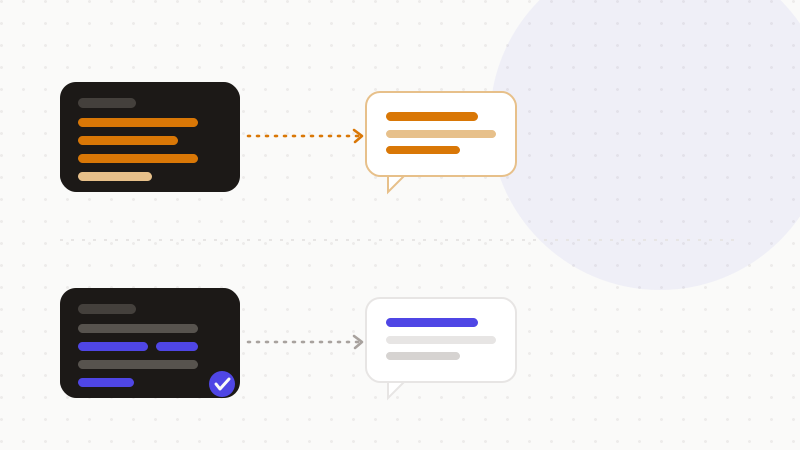
The 5-step routine (and its limit)
To lock in the reflex, always follow the same order before sending a prompt:
- 1Separate the sensitive data from the task: state the instruction first, then look at what really needs to come with it.
- 2Generalize identities and precise details (names, contact info, addresses).
- 3Replace what must stay traceable with consistent placeholders, mapping kept out of the prompt.
- 4Cut down to the minimal needed excerpt, without uploading the raw document.
- 5Re-read one last time: no name, number, email, address or secret should remain before sending.
These habits sharply reduce exposure, but they have a limit: they rely on your vigilance, on every prompt, under time pressure. One identifier missed in a long excerpt is enough to reopen the gap. Automation — detect, then tokenize systematically — removes that risk at scale, including the cases a human reader would miss. That's the difference between a good habit and a guarantee. For the full method and tooling, see our guide “How to anonymize your data before using AI”; and to understand why even careful people end up pasting data, “Why careful people paste data into AI.”
That's exactly what ONYRI Sanitize is for: the engine spots names, numbers, addresses and secrets and replaces them with consistent, reversible tokens before sending; detection and the token↔value mapping stay in your browser, and only anonymized text reaches the AI. Your writing habits still matter — the tool makes them systematic, down to the identifier the eye would have let through.
Frequently asked questions
- How do I use ChatGPT without sharing personal data?
- Don't put the personal data in the prompt. Generalize identities (“a client” instead of a name), replace what must stay consistent with reversible placeholders, paste only the needed excerpt rather than the whole document, and re-read the prompt before sending. The CNIL advises never entering confidential information into a consumer AI service.
- Is it risky to paste a whole document into a prompt?
- Yes. Once the text is sent, you no longer control how it's processed: it may be stored, reviewed by humans and, unless you opt out, used for training. The minimization principle (GDPR, ICO) requires providing only what's strictly necessary — paste the relevant clause or passage, never the entire raw file.
- Is a placeholder like CLIENT_1 enough to protect my data?
- Replacing a direct identifier with a consistent placeholder is pseudonymization, recognized under the GDPR as a minimization measure: the model gets the structure without the real identity, provided you keep the mapping out of the prompt. Done by hand, the risk is missing one; an automatic detection engine also covers the cases you'd overlook.
Sources & references
- CNIL Q&A on the use of generative AI systems — guidance that end-users must never submit confidential or personal data in prompts to consumer AI services — CNIL (Commission Nationale de l'Informatique et des Libertés)
- ICO guide to the data minimisation principle — collect and process only the minimum personal data necessary for each purpose — Information Commissioner's Office (ICO, UK)
- How to protect your privacy from ChatGPT and other AI chatbots — practical habits: generalize details, don't paste what you wouldn't share, opt out of training/memory — Mozilla Foundation
Keep your sensitive data in your browser
ONYRI Sanitize detects and masks your sensitive data before it reaches the AI, then restores the answer — from names to API keys.