How to Anonymize Data Before Using AI (Step by Step)
Anonymize data before AI in 4 steps: spot sensitive fields, swap them for reversible tokens, send the text, then detokenize the answer locally on your device.
To anonymize data before using AI, follow four steps: (1) spot the sensitive categories in your text or file — identities, contact details, identifiers, financial data, secrets and API keys, health; (2) replace each value with a consistent, reversible token rather than XXXX, so you keep the context; (3) send the AI the already-anonymized text; (4) re-inject the original values into the answer locally (detokenization). This is the recommended way to protect your data before pasting it into ChatGPT, Claude or Gemini: only neutralized text leaves your device, and the mapping table never travels with it.
Step 1 — Spot the sensitive categories
Before masking anything, you need to know what you're looking for. The NIST SP 800-122 guide, devoted to protecting the confidentiality of personally identifiable information, recommends a contextual approach: identify the identifying information and calibrate the level of protection by the impact of a leak, rather than with a uniform rule. In practice, reason by families, since not all carry the same severity:
- Identities: names, dates of birth, postal addresses.
- Contact details: emails, phone numbers, account handles.
- Official identifiers: social security numbers, ID documents, registration numbers.
- Financial data: bank details, IBAN, salary figures, tax numbers.
- Technical secrets: API keys, access tokens, passwords, cloud keys.
- Health: diagnoses, treatments, any medical data.
Depending on your case, certain families dominate: an HR spreadsheet concentrates identities and financial data (see the dedicated guide to anonymizing HR data before AI), a document export often mixes identities and contact details (the guide to anonymizing a document before AI), and a code excerpt mostly hides secrets and API keys (the guide to pasting code into AI without leaking secrets). Exhaustive spotting is precisely the step a human misses most often — which is why it pays to automate it.
Step 2 — Replace with reversible tokens (not XXXX)
The common reflex — masking with “XXXX” or blacking out — destroys meaning. Replacing “Mary Smith” with [PERSON_1] consistently (always the same token for the same value) lets the AI reason about the relationships in the text instead: who does what, which amount for which client. Reversibility on the browser side then lets you recover a usable answer after detokenization — something neither redaction nor plain deletion allows.
Technically, replacing a value with a reversible token is pseudonymization. The GDPR (article 4(5)) defines it as processing where data can no longer be attributed to a person without “additional information” — here, the token↔value mapping — provided that information is kept separately and protected. The EDPB's Guidelines 01/2025 on pseudonymisation, adopted on 16 January 2025, describe exactly this mechanism: replace identifying information with new identifiers that only allow attribution with additional information kept apart. The practical consequence: the key must never travel with the text sent to the AI.
Steps 3 & 4 — Send the anonymized text, then detokenize locally
Once the text is neutralized, you send it to the AI like any other prompt. The model reasons over the tokens, produces its answer, and you re-inject the original values on your side — the AI never saw your real information. The sequence is always the same:
- 1Anonymize: each sensitive value becomes a consistent, reversible token.
- 2Verify: check that no value remains in the clear before sending.
- 3Send the AI the tokenized text, and only that.
- 4Detokenize the answer locally: tokens turn back into your real values.
This split solves a deeper problem: depending on the account, the status of pasted data varies. By default, OpenAI may use the content of consumer ChatGPT accounts to improve its models, whereas business and API offerings are not used for training unless you opt in. Even with training off, data can be retained for up to 30 days for abuse monitoring. Anonymizing upstream makes these variations irrelevant for sensitive data: it never leaves your device.
Why redacting by hand fails
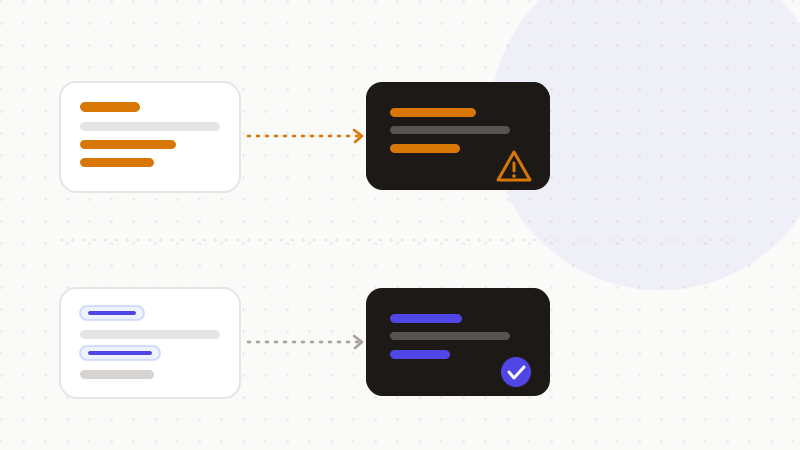
Manual redaction fails for three documented reasons, which is what justifies automated tokenization. First, visual masks — black boxes, highlighting — often leave the data recoverable beneath the surface. Second, human oversight is common. Third, it doesn't scale on a spreadsheet of thousands of rows (see the guide to anonymizing a spreadsheet before AI). A 2021 study cited by Redactable actually measures roughly 91.37% accuracy for manual methods, versus 97.10% for automated tools.
Real incidents confirm it: masking doesn't erase. Here are three cases where the “mask” gave way, plus the Samsung leak that shows why you must act before sending.
| Date | Incident | What leaked | The lesson |
|---|---|---|---|
| 2014 | NSA document published by the New York Times | Censored passages revealed by a simple copy-paste | A visual mask doesn't remove the underlying data |
| 2019 | PDF from Paul Manafort's defense | Text “masked” with black boxes, still accessible | Highlighting hides the display, not the content |
| Dec. 2025 | Government documents (Epstein files) | Redacted passages recovered with basic techniques | Redaction shared as-is stays reversible |
| Apr.-May 2023 | Internal leak at Samsung via ChatGPT | Source code and meeting transcript pasted into the AI | Once sent, the data is neither recoverable nor deletable |
The Samsung case is foundational: in April 2023, employees accidentally leaked sensitive internal data by pasting it into ChatGPT — including source code and a meeting transcript. On 1 May 2023, the company banned generative AI tools on its devices, citing the impossibility of recovering or deleting data once it's sent to external servers. It's the concrete illustration of why you must anonymize BEFORE sending, not after.
Putting the method into practice without missing a thing
The theory is simple; the trap is completeness. One forgotten name, one IBAN left in the clear, and the protection collapses. That's why a systematic detection engine beats eyeballing: it covers every family at once, keeps tokens consistent, and scales across an entire spreadsheet.
That's exactly what ONYRI Sanitize is for: the engine detects sensitive data and replaces it with reversible tokens, detection and the mapping table stay in your browser, and only anonymized text reaches the AI. Detokenization happens locally on your device — the tool sees tokens, never your real information, in line with the pseudonymization logic described by the EDPB.
Frequently asked questions
- How do I anonymize my data before pasting it into ChatGPT?
- In four steps: spot the sensitive categories (identities, contact details, identifiers, financial, secrets, health); replace each value with a consistent, reversible token rather than XXXX; send ChatGPT the already-anonymized text; then detokenize the answer locally. Only the neutralized text leaves your device, and the mapping table never travels with it.
- Should I mask with XXXX or use tokens?
- Use tokens. Masking with XXXX destroys context and makes the AI's answer useless. A consistent token — always the same for the same value — preserves the relationships in the text and stays reversible on the browser side, which lets you recover a usable answer after detokenization.
- Is tokenizing true anonymization under the GDPR?
- No: it's pseudonymization (GDPR article 4(5)), because it's reversible with the key. According to the EDPB, as long as that key exists the data remains personal data. The protection comes from keeping the key out of the AI provider's reach — ideally only locally, on the browser side.
Sources & references
- Analysis of the EDPB's Guidelines 01/2025 on pseudonymisation under the GDPR (art. 4(5) definition, reversible nature, pseudonymized data = personal data) — McCann FitzGerald (law firm)
- Survey of documented redaction failures (NSA 2014, Manafort 2019, Epstein 2025) and why manual masking leaves data recoverable — Redactable
- Samsung bans ChatGPT and generative AI tools after an internal data leak (April-May 2023) — TechCrunch
Keep your sensitive data in your browser
ONYRI Sanitize detects and masks your sensitive data before it reaches the AI, then restores the answer — from names to API keys.