Grok (xAI) and Your Data: Why Anonymize First
Per xAI, Grok trains its models on your conversations unless you opt out. Anonymizing first keeps identifiers out of the prompt, whatever the setting.
Should you anonymize your data before sending it to Grok? Direct answer. Yes, it's advisable. Per xAI's Consumer FAQ, your conversations serve to train the models by default. There is a setting to decline, but you have to turn it off yourself. That default is opt-out, not opt-in. Grok is still a third party that receives your prompt. Anonymizing before you send keeps identifiers out of the text, whatever the setting's state. ONYRI Sanitize does it in your browser.
What xAI says about your data
Let's start with the attributed fact. Per xAI's Consumer FAQ, a setting called « Improve the Model » governs training. You'll find it under Settings > Data Controls on the mobile app, and Settings > Data on grok.com. As long as you don't deselect it, your conversations can serve to train Grok. So it's an opt-out mechanism.
The xAI Privacy Policy, effective 10 July 2025, points the same way. Per xAI, « User Content » can serve to train the models. This covers your inputs — prompts, files, images, audio, video — and Grok's outputs. This adds to the public web data used elsewhere.
To its credit, and this deserves crediting, xAI offers the user several controls. Here they are, as the FAQ describes them, at the date of our reading (as of 2026-08-08).
- Per xAI, deselecting « Improve the Model » stops training, but only for your NEW conversations.
- Per xAI, the « Private Chat » option also excludes the exchange from training.
- Nuance cited by xAI: feedback provided voluntarily may still be used, even after you turn the setting off.
- Per xAI, in unauthenticated use outside the EU and the UK, content may be collected anonymously, with no opt-out option.
The case of Grok inside X
Grok also lives inside the social network X. There, another source documents an enabled default. Per Silicon Republic, the setting that allows your public posts and interactions to be used to train Grok is enabled by default. You have to uncheck it yourself, under Settings, then Privacy and safety, then Grok.
Per xAI, for Grok inside X, the opt-out goes through the X Help Center, not the grok.com settings. Two surfaces, two paths to decline. One point deserves to be clear. The opt-out, where it exists, doesn't remove data already used before your choice. It doesn't act retroactively.
Why anonymize first, whatever the setting
Setting an opt-out helps. But anonymizing first keeps its value, for several reasons.
- 1The default trains on your exchanges: as long as the setting isn't changed, your prompts feed the model.
- 2The opt-out only applies to new conversations and doesn't erase what has already been used.
- 3In unauthenticated use outside the EU and the UK, per xAI, there is no opt-out option at all.
- 4Anonymizing before sending is a measure you control end to end, independent of the setting's state.
The table below recaps Grok's surfaces, as xAI and Silicon Republic describe them, and what ONYRI adds on top.
| Grok surface | Training by default, per the cited source | What ONYRI changes |
|---|---|---|
| grok.com and mobile app | « Improve the Model » opt-out: training unless disabled, per xAI | The prompt leaves already pseudonymized |
| Grok inside X | Use of public posts enabled by default, per Silicon Republic | Your real values stay on your device |
| Unauthenticated use outside EU / UK | Anonymous collection with no opt-out, per xAI | Reduces exposure whatever the setting |
How ONYRI does it
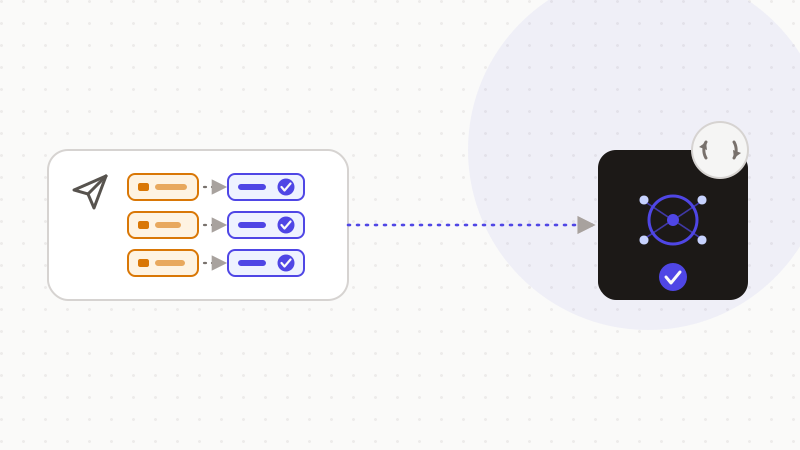
The ONYRI extension grafts directly onto the Grok site, on grok.com as on Grok inside X. It acts in your browser, before you send. The flow takes four steps.
- 1You write your prompt on Grok as usual.
- 2In the browser, the extension detects sensitive data and replaces it with reversible tokens.
- 3The already-pseudonymized prompt goes to Grok; the token ↔ value mapping stays in the tab, on your device.
- 4The answer comes back, and your real values are restored on screen, in the browser.
Key point on the boundary. The real values and the token ↔ value mapping never leave your browser. Grok only receives already-pseudonymized text, whatever the training setting's state. Detection stays heuristic: it strongly reduces exposure, without promising zero risk. The extension acts on AI chat sites, not on an IDE's autocomplete nor on another tool's internal calls. A Free tier serves as an entry point; advanced features belong to the paid plans.
In short, with Grok, training on your exchanges is the default, per xAI, with an opt-out you turn on yourself. On X, per Silicon Republic, the use of your public posts is also enabled by default. These controls exist, and that deserves credit. But anonymizing before you send stays a measure you keep under control. ONYRI detects, replaces with reversible tokens, then restores the answer in your browser. This approach reduces your data's exposure. It doesn't make it « anonymous under the GDPR »: reversible tokens are still pseudonymization.
Frequently asked questions
- Should you anonymize your data before sending it to Grok (xAI)?
- Yes, it's advisable. Per xAI's Consumer FAQ, your conversations serve to train Grok by default, with an « Improve the Model » setting to turn off to decline. Grok is still a third party, and the opt-out only applies to new conversations. Anonymizing before sending keeps your identifiers out of the prompt, whatever the setting.
- Does Grok train its models on my conversations by default?
- Per xAI, yes, unless you turn off « Improve the Model » (Settings > Data Controls on mobile, Settings > Data on grok.com). Per Silicon Republic, on X the setting allowing your public posts to be used to train Grok is also enabled by default. In unauthenticated use outside the EU and the UK, per xAI, there is no opt-out option. Always check the policy in force.
- Does anonymizing with ONYRI make me GDPR-compliant?
- No, not on its own. Per the CNIL, reversible tokens are pseudonymization: your data stays personal under the GDPR. The benefit is concrete: your real values don't leave your browser, which strongly reduces exposure and serves the minimization principle.
Sources & references
- xAI Consumer FAQs — Data Controls and « Improve the Model » (training opt-out, Private Chat, nuances) — archived snapshot — xAI (archived via Internet Archive)
- Grok trains on user data by default: how to turn it off (X setting enabled by default, how to disable) — Silicon Republic
- AI and the GDPR: new recommendations for responsible innovation (upstream anonymization, pseudonymization, minimization) — CNIL
Keep your sensitive data in your browser
ONYRI Sanitize detects and masks your sensitive data before it reaches the AI, then restores the answer — from names to API keys.