How to Anonymize Your Data Before Google Gemini
Google says human reviewers may read some Gemini conversations. Anonymizing before you send keeps your identifiers out of their view.
You want to anonymize your data before pasting it into Google Gemini. Here's the direct answer. Replace names, emails, identifiers and keys with tokens before you send. Google says human reviewers may read a subset of Gemini Apps conversations. If your prompt holds only tokens, those reviewers don't see your real values. The ONYRI extension does this replacement in your browser. Let's first look at what Google says, precisely.
What Google says about Gemini data
Let's start with the facts, as Google publishes them. They concern consumer Gemini Apps, the most common use.
- According to Google's Gemini Apps Privacy Hub, a subset of conversations is reviewed by human reviewers. They include trained service providers, and the review helps improve Google services.
- According to Google, this review also helps improve the generative models and other machine-learning technologies that power Gemini.
- According to Google, you should not enter information you wouldn't want a reviewer to read, or Google to use to improve its services.
- According to Google, conversations reviewed by human reviewers are not deleted when you clear your activity: they are kept for up to three years.
That last point deserves a pause. According to Google, this up-to-three-years retention applies even if the Gemini Apps Activity setting is off. In other words, turning off history does not remove conversations that already entered the review flow.
Google still offers safeguards, which is a good thing. According to Google, conversations are disconnected from your account before they are seen or annotated by reviewers. According to Google, temporary chats and turning off Keep Activity help limit the improvement use. These controls reduce exposure, but they don't replace never entering the sensitive data.
The enterprise tier differs sharply
All of this concerns consumer Gemini Apps. The professional editions don't follow the same rules, and Google states this clearly.
According to the Generative AI in Google Workspace Privacy Hub, content in eligible Workspace editions is not reviewed by humans. According to Google, it is also not used to train generative models outside the domain without permission. According to Google, Workspace does not use customer data to train models without the customer's prior instruction or permission. According to Google, if you have a work or school account, your use of Gemini Apps may fall under different data-processing terms.
The lesson is simple. Behavior depends on your edition. Check which one applies to your account before you enter anything sensitive.
| Aspect | Gemini Apps (consumer) | Eligible Workspace editions |
|---|---|---|
| Human review | A subset reviewed by reviewers, per Google | No human review, per Google |
| Model training | Used to improve the models, per Google | No training outside the domain without permission, per Google |
| Retention of reviewed chats | Up to three years, per Google | Distinct processing terms, per Google |
| Displayed notice | Do not enter confidential information, per Google | Refers to the Workspace Privacy Hub, per Google |
Why anonymize before sending
An AI answer is computed from the text you actually send. That's the key point. If you replace the sensitive data with a token before sending, the model and any reviewers see only the token.
The CNIL agrees with this logic. According to the CNIL, to comply with the GDPR in AI systems, it is recommended to anonymize personal data. Where possible, the CNIL advises general detection and pseudonymization rules, rather than a blocklist. Anonymizing before you send applies this principle upstream, on the user's side.
Let's be precise about words. Reversible tokens are pseudonymization, not irreversible anonymization. Your data stays personal under the GDPR. The benefit is concrete rather than legal: your real values don't leave in the prompt.
How ONYRI does it
ONYRI is a browser extension. It detects and replaces sensitive data before the text leaves for Gemini. The flow takes four steps.
- 1You write your prompt on the Gemini site, as usual.
- 2The extension detects sensitive data and replaces it with reversible tokens, in the browser.
- 3The anonymized text goes to Gemini; the token ↔ value mapping stays in your tab, never on our servers.
- 4The answer comes back, and the extension restores your real values on screen, in the browser.
Two honest notes. First, the anonymized text does go to Gemini: ONYRI does not route your traffic through its servers and does not "see" it. Second, detection is heuristic: it strongly reduces exposure, it doesn't guarantee zero risk. A Free tier serves as an entry point; technical secrets, custom rules and profiles belong to the paid plans.
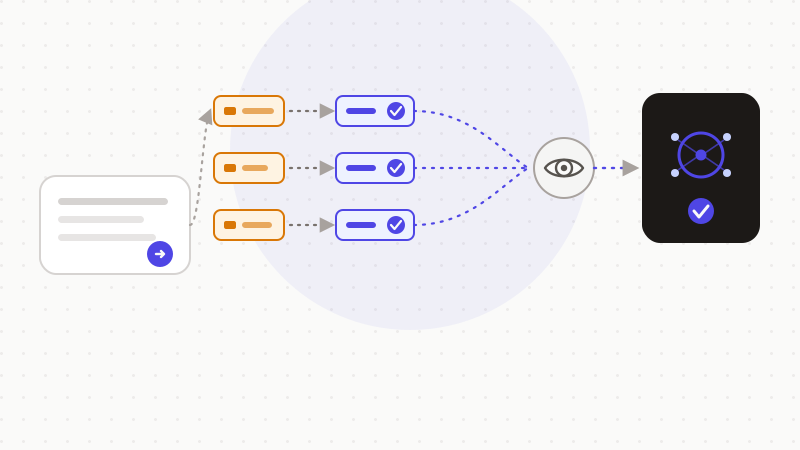
That's the logic of ONYRI. Detect, replace with reversible tokens, restore the answer. The mapping stays in your browser, never on our servers. Google says human reviewers may read Gemini Apps conversations; anonymizing before you send keeps your identifiers out of their view. This approach reduces your data's exposure. It doesn't make it anonymous under the GDPR, but it keeps your real values on your device.
Frequently asked questions
- Should you anonymize your data before putting it in Google Gemini?
- It's prudent, especially on consumer Gemini Apps. According to Google's Gemini Apps Privacy Hub, a subset of conversations is reviewed by human reviewers, and Google advises not to enter confidential information. Replacing names, emails and keys with tokens before sending follows that notice and reduces exposure.
- Does Google Gemini use my conversations to train?
- It depends on the edition. According to Google, on consumer Gemini Apps some data helps improve the models and can be reviewed by human reviewers. According to the Workspace Privacy Hub, eligible Workspace editions do not review content by humans. They also do not use it to train models outside the domain without permission.
- Does anonymizing my prompts make them GDPR-compliant?
- No, not on its own. Reversible tokens are pseudonymization, not irreversible anonymization: your data stays personal under the GDPR. The benefit is concrete: your real values don't leave for Gemini, which reduces exposure and serves the minimization principle.
Sources & references
- Gemini Apps Privacy Hub (human reviewers, up to 3-year retention, do not enter confidential information) — Google
- Generative AI in Google Workspace Privacy Hub (no human review nor training outside the domain without permission, eligible editions) — Google Workspace
- Developing AI systems: the CNIL's recommendations for GDPR compliance (anonymization / pseudonymization) — CNIL
Keep your sensitive data in your browser
ONYRI Sanitize detects and masks your sensitive data before it reaches the AI, then restores the answer — from names to API keys.