How to Anonymize Your ChatGPT Prompts Automatically
Manually, you always miss one identifier. A tool that masks your sensitive data before sending makes anonymization reliable.
To anonymize your ChatGPT prompts reliably, drop the manual method. By hand, you mask a name, then miss an email, an IBAN or an API key. A single identifier is enough to give away the rest. The real answer is a tool that detects and masks sensitive data automatically before sending. It replaces each value with a neutral token. Then it restores the real values in the AI's reply. You gain reliability, without tedious proofreading.
Anonymizing by hand: why it fails
Manual copy-paste has a flaw. It relies on your attention. And attention tires. On a long prompt, you mask the client's name, but leave their number. You strike out the email, then forget the IBAN further down. Here is what breaks in practice:
- You always miss one identifier on long or hastily written prompts.
- Some data is barely visible: an API key, an internal ID, an employee number.
- Rewriting each value by hand takes time and breaks your train of thought.
- Once the prompt is sent, the oversight is irreversible: the data is already gone.
How a tool anonymizes your prompts automatically
A good tool removes the manual step. It works for you, at the moment you send. The principle comes down to four steps:
- 1The tool integrates into the AI's page, right inside your browser.
- 2On sending, it detects the sensitive identifiers present in your text.
- 3It replaces each real value with a token. The model only sees tokens.
- 4On the reply, the tool restores the real values on screen, for you alone.
The result is clear. The AI answers normally, but it never read your real data. The mapping between token and value stays on your device. It doesn't travel to a server. That is what separates useful automation from a mere server-side filter.
What the CNIL says: minimization and pseudonymization
The GDPR sets a simple principle: minimization. Your data must be adequate, relevant and limited to what is strictly necessary. Sending an AI only what is truly useful fits that logic. The CNIL confirms it in its 2025 AI recommendations. An AI system built on personal data does not escape the GDPR. The principles of Article 5, including minimization, apply fully.
One point deserves to be clear. Replacing a value with a reversible token, with a mapping kept aside, is pseudonymization. The CNIL sets it apart from anonymization. Anonymization is irreversible: once effective, the data is no longer personal and leaves the GDPR. Pseudonymization, being reversible, keeps a personal character. It lowers the risk, but does not take your data out of scope. No tool should promise you otherwise.
| Criterion | By hand | Automatic (tool) |
|---|---|---|
| Reliability | Depends on your attention | Systematic detection on every send |
| Oversights | Frequent on long prompts | Greatly reduced, but not zero |
| Effort | Reread and rewrite each value | No extra action |
| AI's reply | Stays full of tokens | Real values restored on screen |
ONYRI: automatic anonymization grafted onto ChatGPT
This is exactly what ONYRI does. A browser extension grafts anonymization directly onto ChatGPT and other AIs. An automatic mode intercepts the send. It detects sensitive data, then replaces it with tokens. The model only receives anonymized text. On the reply, the extension restores the real values on screen. Detection uses built-in detectors and your custom rules. Key point: the token↔value mapping stays in the tab, in your browser. It never reaches a server. ONYRI also comes as a web app (Text, Tables, Chat). An entry offering lets you test; advanced use belongs to the paid plans.
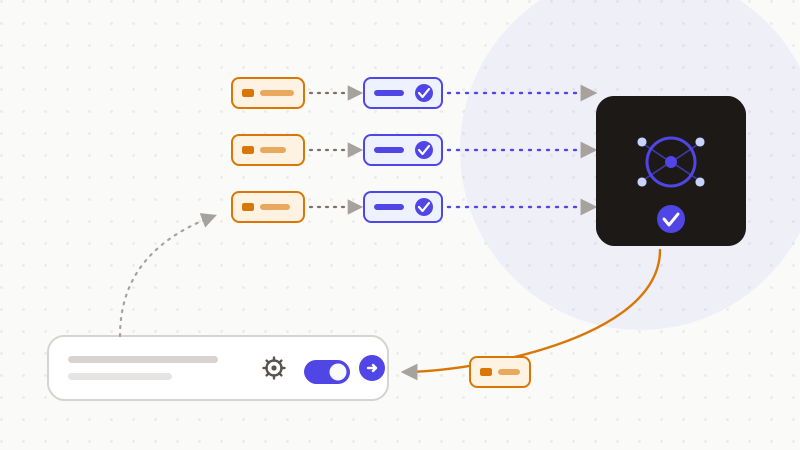
Automatic beats manual because it doesn't rely on your vigilance. ONYRI detects, replaces with a reversible token, then restores — all in the browser, where the mapping stays. This approach reduces your data's exposure at the point of sending. It does not remove it 100%: detection stays heuristic, and reversible tokens remain pseudonymization. Check the edge cases. But you keep control of what matters: your real values, on your device.
Frequently asked questions
- How do I anonymize my ChatGPT prompts automatically?
- By using a tool that integrates into the AI's page and masks sensitive data at the moment you send. It detects identifiers, replaces them with tokens, then restores the real values in the reply. By hand, you always miss one identifier; automation applies detection on every send, without proofreading effort. Detection stays heuristic: it greatly reduces exposure, without removing it 100%.
- Does anonymizing my prompts make them « anonymous » under the GDPR?
- No, not in the strict sense. Replacing a value with a reversible token is pseudonymization, not anonymization. The CNIL distinguishes the two: anonymization is irreversible and takes data out of the GDPR, while pseudonymization keeps a personal character. The real benefit lies elsewhere: your real values never reach the model and stay on your device. That is minimization at the point of sending.
- Is automatic anonymization 100% reliable?
- No, and no serious tool should promise it. Detection relies on heuristics (patterns, rules) that greatly reduce exposure without eliminating it. An unusual identifier can slip through. The right reflex is still to check edge cases before sending. Automation doesn't remove your responsibility, it makes it far easier to uphold.
Sources & references
Keep your sensitive data in your browser
ONYRI Sanitize detects and masks your sensitive data before it reaches the AI, then restores the answer — from names to API keys.
Anonymize my prompt