Comment caviarder les données sensibles avant de les donner à une IA ?
Barrer ou écrire « XXX » détruit l'info. La bonne méthode : un caviardage réversible par jetons, restauré côté navigateur. Voici comment.
Caviarder les données sensibles avant de les donner à une IA, c'est un bon réflexe. Mais la méthode manuelle déçoit souvent. Barrer au marqueur ou remplacer par « XXX » a deux défauts. D'abord, on oublie des occurrences. Ensuite, et surtout, on détruit l'information. L'IA ne voit plus que des « XXX » interchangeables. Elle ne peut plus rendre une réponse exploitable. Et vous ne pouvez plus remettre les vraies valeurs. La bonne méthode est différente : un caviardage réversible. On remplace chaque donnée sensible par un jeton unique. On garde la correspondance de son côté. Puis on restaure les vraies valeurs dans la réponse du modèle.
Caviarder à la main : deux défauts
La méthode instinctive consiste à supprimer les identifiants à la main. On barre le nom. On remplace le numéro de client par « XXX ». C'est mieux que rien. Mais deux problèmes surgissent vite.
- On en oublie. Un nom revient trois paragraphes plus loin, et il passe.
- On perd l'information utile. Trois clients différents deviennent tous « XXX », donc indistinguables.
- La réponse devient inutilisable. L'IA raisonne sur des trous, pas sur des données cohérentes.
- On ne peut pas revenir en arrière. « XXX » ne se retransforme pas en la vraie valeur.
Le copier-coller manuel a donc une limite de fond. Il choisit entre deux maux. Soit vous laissez passer des données sensibles. Soit vous mutilez le texte au point de le rendre inexploitable.
Le caviardage réversible : garder le sens, réduire l'exposition
Un caviardage réversible remplace chaque donnée sensible par un jeton. Le nom « Marie Dupont » devient par exemple un jeton stable. Chaque valeur reçoit son propre jeton. Deux clients différents gardent deux jetons différents. L'IA voit donc un texte cohérent. Elle peut raisonner, comparer, structurer. Vous, vous conservez la table de correspondance jeton↔valeur. À la fin, vous rétablissez les vraies valeurs dans la réponse.
Les quatre étapes d'un caviardage réversible
En pratique, la démarche tient en quatre étapes. Elles s'enchaînent dans cet ordre.
- 1Repérer les données sensibles : noms, e-mails, IBAN, numéros, clés techniques.
- 2Remplacer chaque valeur par un jeton réversible et cohérent.
- 3Envoyer le texte masqué à l'IA, jamais les vraies valeurs.
- 4Restaurer les vraies valeurs dans la réponse, de votre côté.
Chaque étape compte. Sauter la première laisse fuir des données. Négliger la quatrième vous laisse une réponse pleine de jetons.
| Critère | Caviardage manuel (« XXX ») | Caviardage réversible (jetons) |
|---|---|---|
| Occurrences oubliées | Fréquentes, contrôle à l'œil | Détection systématique, mais heuristique |
| Sens conservé | Perdu, tout devient « XXX » | Conservé, jetons distincts et stables |
| Réponse exploitable | Rare, l'IA raisonne sur des trous | Oui, l'IA voit un texte cohérent |
| Retour aux vraies valeurs | Impossible | Automatique, via la correspondance |
Minimiser, un principe du RGPD
Cette approche rejoint un principe du RGPD : la minimisation. L'article 5 demande de limiter les données au strict nécessaire. Ne transmettre à l'IA que l'utile réduit l'exposition. La CNIL le rappelle pour l'IA. Un système d'IA fondé sur des données personnelles n'échappe pas au RGPD. Et quand des données anonymes ou synthétiques suffisent, il faut les privilégier. Le caviardage réversible sert cette logique. Il envoie au modèle le sens, pas les identités.
Comment ONYRI caviarde vos données
ONYRI Sanitize applique cette méthode, dans le navigateur. Le moteur repère les données sensibles avec des détecteurs intégrés. Vous ajoutez vos propres règles pour votre métier. Chaque valeur est remplacée par un jeton réversible. Le point clé : la correspondance jeton↔valeur reste sur votre poste. Elle ne rejoint aucun serveur. La réponse de l'IA est ensuite détokénisée dans votre navigateur. Vous retrouvez vos vraies valeurs, le modèle n'a vu que des jetons.
Le produit se décline en plusieurs surfaces. Une application web avec les espaces Texte, Tableaux et Chat. Une extension de navigateur pour les grands sites d'IA. Il existe une offre d'entrée et des offres payantes Pro et Team. Vous choisissez selon vos besoins.
Soyons clairs sur les limites. La détection est heuristique. Elle combine des motifs et un calcul d'entropie. Elle réduit l'exposition, elle ne la supprime pas. Une occurrence inhabituelle peut passer. Relisez toujours le texte masqué avant l'envoi.
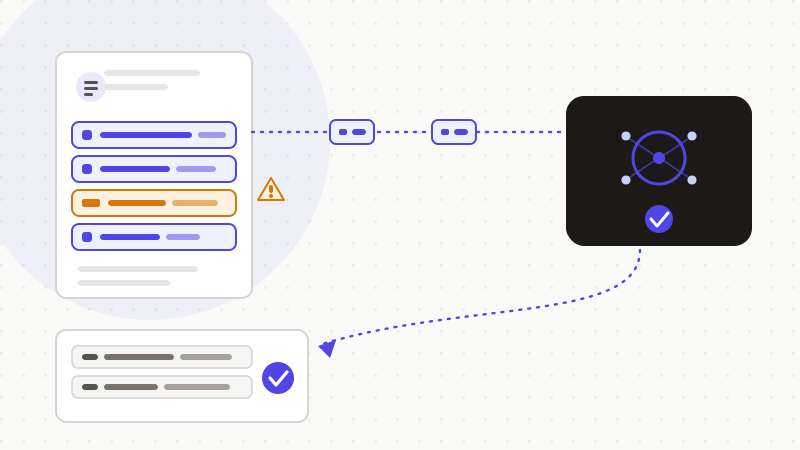
Le caviardage bien fait n'efface pas l'information : il la met de côté, le temps du prompt. ONYRI vous laisse utiliser l'IA en gardant vos vraies valeurs sur votre appareil. Le modèle travaille sur des jetons cohérents. Vous récupérez une réponse exploitable, avec vos données restaurées. C'est de la minimisation au point précis où elle compte : juste avant l'envoi.
Questions fréquentes
- Comment caviarder les données sensibles avant de les donner à une IA ?
- Ne barrez pas au marqueur et n'écrivez pas « XXX » : vous en oublieriez et vous détruiriez l'information. Préférez un caviardage réversible. Repérez les données sensibles, remplacez chaque valeur par un jeton cohérent, envoyez le texte masqué, puis restaurez les vraies valeurs dans la réponse. L'IA travaille sur des jetons, vous gardez la correspondance de votre côté.
- Le caviardage réversible rend-il mes données anonymes au sens du RGPD ?
- Non. Un caviardage réversible correspond à une pseudonymisation, pas à une anonymisation. La CNIL réserve l'anonymisation à un procédé irréversible. Vos données restent des données personnelles, et le RGPD continue de s'appliquer. Le bénéfice réel est la minimisation : la vraie valeur ne part pas dans le prompt, elle reste sur votre poste.
- Pourquoi ne pas simplement remplacer par « XXX » ?
- Parce que « XXX » détruit l'information. Trois clients différents deviennent identiques, et l'IA ne peut plus rendre une réponse exploitable. Surtout, « XXX » est irréversible : impossible de retrouver la vraie valeur. Un jeton réversible garde le sens et se restaure ensuite dans la réponse.
Sources et références
- L'anonymisation de données personnelles (anonymisation irréversible vs pseudonymisation réversible ; données pseudonymisées encore personnelles) — CNIL
- Développement des systèmes d'IA : les recommandations de la CNIL pour respecter le RGPD (minimisation, article 5) — CNIL
- Règlement général sur la protection des données (RGPD) — texte consolidé (art. 4 pseudonymisation, art. 5 minimisation) — EUR-Lex (Union européenne)
Gardez vos données sensibles dans votre navigateur
ONYRI Sanitize détecte et masque vos données sensibles avant l'envoi à l'IA, puis restaure la réponse — du nom à la clé API.
Anonymiser mon prompt