Quel outil pour anonymiser vos données avant l’IA ?
Le bon outil détecte vos données sensibles, les remplace par des jetons réversibles et garde la correspondance dans votre navigateur.
Vous cherchez un outil pour anonymiser vos données avant de les confier à une IA. Voici la réponse directe. Le bon outil détecte les données sensibles à votre place. Il les remplace avant l'envoi au modèle. Il garde la correspondance de votre côté, pour restaurer la réponse. Et il tourne dans votre navigateur, pour que les données détectées ne partent pas en clair. ONYRI Sanitize est conçu pour ça. Mais posons d'abord les critères. Vous choisirez ensuite en connaissance de cause.
La réponse courte : les 4 fonctions d'un bon outil
Un bon outil d'anonymisation avant l'IA remplit quatre fonctions. Les voici, dans l'ordre où elles comptent.
- Il détecte seul les données sensibles : noms, e-mails, IBAN, numéro de sécurité sociale, clés API…
- Il les remplace par des jetons avant que le prompt parte vers le modèle.
- Il garde la correspondance jeton ↔ valeur de votre côté, pour restaurer la réponse.
- Il travaille côté navigateur, pour garder les vraies valeurs détectées sur votre poste.
Pourquoi le faire à la main échoue
La méthode manuelle paraît simple. On barre les noms. On efface l'IBAN au marqueur. On supprime les identifiants à la main avant de copier-coller. En pratique, ça déraille vite.
D'abord, c'est lent. Nettoyer chaque prompt prend du temps. Ensuite, c'est faillible. On oublie toujours un identifiant. Un e-mail dans une signature. Un numéro dans un tableau. Enfin, vous perdez la réponse utile. Si vous effacez les vraies valeurs, l'IA répond sur du vide. Impossible de remettre vos données dans son résultat.
Les critères d'un bon outil d'anonymisation
Tous les outils ne se valent pas. Voici les critères qui comptent vraiment.
- Détection large : noms, e-mails, IBAN, numéro de sécu, clés API, secrets techniques.
- Réversibilité : pouvoir restaurer les vraies valeurs dans la réponse de l'IA.
- Traitement local : le remplacement se fait dans le navigateur, pas sur un serveur tiers.
- Compatibilité : l'outil fonctionne avec vos modèles habituels (ChatGPT, Claude, Gemini…).
- Règles personnalisables : ajouter vos propres termes sensibles (noms de projets, codes clients).
À la main ou avec un outil dédié
Le tableau ci-dessous résume l'écart. Il oppose le nettoyage manuel à un outil pensé pour l'IA.
| Critère | Nettoyage à la main | Outil dédié (ONYRI) |
|---|---|---|
| Détection | Vous cherchez vous-même, au risque d'en oublier | Détecteurs automatiques + règles perso |
| Vitesse | Lent, prompt par prompt | Immédiat, à la volée |
| Réversibilité | Perdue : les valeurs sont effacées | Jetons réversibles, réponse restaurée |
| Emplacement | Copier-coller manuel | Traitement dans le navigateur |
Comment ONYRI s'y prend
ONYRI Sanitize applique ces critères de bout en bout. Le parcours tient en quatre étapes.
- 1Vous collez votre texte ou importez un tableau dans l'application.
- 2Le moteur détecte les données sensibles et les remplace par des jetons réversibles.
- 3Le texte anonymisé part vers le modèle ; la correspondance jeton ↔ valeur reste dans votre navigateur.
- 4La réponse revient, et l'application remet vos vraies valeurs à leur place, côté navigateur.
Deux surfaces couvrent vos usages. L'application web gère le texte, les tableaux et un onglet Chat intégré. Une extension navigateur greffe ONYRI directement sur les grands sites d'IA. Vous ajoutez vos propres règles pour les termes maison. Une offre Free sert de point d'entrée ; les fonctions avancées relèvent des offres payantes.
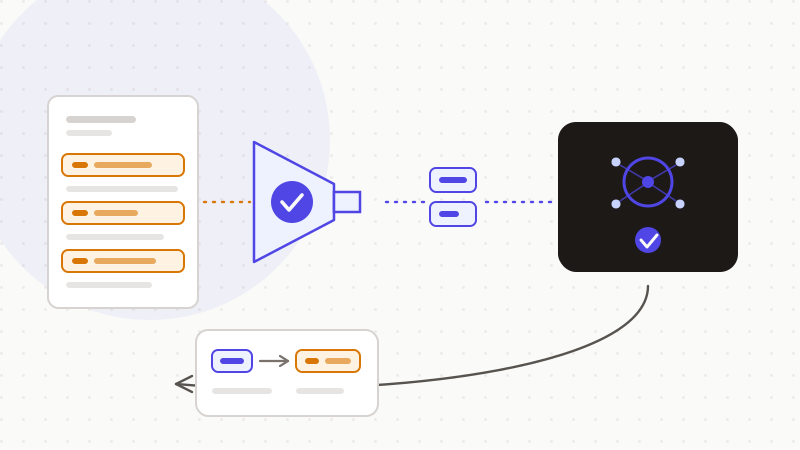
C'est là toute la logique d'ONYRI Sanitize. Détecter, remplacer par des jetons réversibles, restaurer la réponse. Le mapping reste dans votre navigateur, jamais sur nos serveurs. Cette approche réduit fortement l'exposition de vos données. Elle ne les rend pas « anonymes au sens du RGPD » : des jetons réversibles restent de la pseudonymisation. Mais elle garde la seule chose qui compte ici sur votre poste — vos vraies valeurs.
Questions fréquentes
- Quel outil utiliser pour anonymiser ses données avant l'IA ?
- Cherchez un outil qui remplit quatre fonctions. Il détecte seul les données sensibles. Il les remplace par des jetons avant l'envoi. Il garde la correspondance de votre côté pour restaurer la réponse. Et il travaille dans le navigateur. ONYRI Sanitize réunit ces quatre fonctions, en application web et en extension navigateur.
- Anonymiser mes données les rend-il conformes au RGPD ?
- Non, pas à soi seul. Des jetons réversibles relèvent de la pseudonymisation, pas de l'anonymisation irréversible : vos données restent personnelles au sens du RGPD. Le bénéfice réel est ailleurs. Vos vraies valeurs n'atteignent jamais le modèle, ce qui réduit fortement l'exposition et sert le principe de minimisation.
- Pourquoi ne pas simplement effacer les données sensibles à la main ?
- Parce que c'est lent et faillible : on oublie toujours un identifiant. Surtout, si vous effacez les vraies valeurs, vous ne pouvez plus les remettre dans la réponse de l'IA. Un outil dédié remplace les données par des jetons réversibles et restaure le résultat automatiquement.
Sources et références
- L'anonymisation de données personnelles (anonymisation irréversible vs pseudonymisation réversible ; données anonymisées hors RGPD) — CNIL
- Développement des systèmes d'IA : les recommandations de la CNIL pour respecter le RGPD (minimisation, anonymisation/pseudonymisation) — CNIL
- Règlement (UE) 2016/679 (RGPD) — définitions art. 4 (pseudonymisation) et principe de minimisation art. 5 — EUR-Lex (Union européenne)
Gardez vos données sensibles dans votre navigateur
ONYRI Sanitize détecte et masque vos données sensibles avant l'envoi à l'IA, puis restaure la réponse — du nom à la clé API.
Anonymiser mon prompt