Is Notion AI Safe With Your Company Data?
Notion AI reads your workspace and passes content to subprocessors like OpenAI and Anthropic. It won't train on your data, but you stay the controller.
Notion AI is reasonably safe for most teams, but the responsibility stays with you. To answer or generate, Notion AI reads the workspace content you point it at: wikis, docs, notes, client records. To do that, it passes that content to third-party model providers. Notion states it does not use your data to train models by default, and it publishes a list of its subprocessors. Under the GDPR, you remain the data controller for the personal data in your workspace. So the fix is governance: control what lands on AI-readable pages, anonymise client identifiers, and check the DPA.
How Notion AI uses your workspace content
Notion AI works over the content in your workspace. It reads pages, docs, notes and records to answer questions and generate text. That is the feature. But reading means processing. To produce answers, Notion AI passes your content to large language models.
Notion states it uses models hosted by Notion, and by organisations such as Anthropic and OpenAI. Those model providers are subprocessors. A subprocessor is a third party that processes your data on the vendor's behalf. Notion maintains a published subprocessor list, so you can see who is in the chain.
What Notion states about training and retention
On training, Notion is explicit. It states that by default, Notion and its AI subprocessors do not use Customer Data to train any models. Its contracts with those providers prohibit such use. This is Notion's own stated position, not an independent audit. Wording like this can change, so re-check the current page.
Notion also describes tiered retention. It states zero data retention for Enterprise-plan workspaces: no data is stored with the LLM providers. For other plans, Customer Data is retained for 30 days or fewer before deletion. The indexing vectors (embeddings) are deleted within 60 days of a page or workspace deletion.
You stay the data controller
Here is the part teams miss. Using an AI feature does not move legal responsibility to the vendor. Under the GDPR, the organisation that decides why and how personal data is processed is the data controller. The ICO, the UK's data protection regulator, puts it plainly: controllers determine the purposes and means of processing. The processor acts on the controller's instructions.
So for the personal data in your workspace, you are the controller. Notion is a processor. Its model providers are further subprocessors. GDPR Article 28 requires that a processor's work be governed by a contract. It also says a processor may engage another only with your authorisation, under equivalent data-protection duties.
This is why the paperwork matters. Sign and check the DPA (Data Processing Addendum, the data-processing contract). Review the subprocessor list before you put regulated data on AI-readable pages. Notion positions itself as a processor operating under a DPA, but the accountability still sits with you.
The risk zones in your workspace
Not every page is equal. The danger is content that the AI can read but that should never reach an external model provider.
- Client PII in meeting notes and CRM-style records.
- Contract terms and commercial pricing.
- Unreleased strategy and product roadmaps.
- Credentials and API keys pasted into pages.
Governance of what lands on those pages sits with you, not the vendor. Notion can secure the pipe. It cannot decide that a given note was safe to share.
| You assume | The reality |
|---|---|
| “Notion AI keeps my data fully in-house” | It passes workspace content to subprocessors like OpenAI and Anthropic |
| “The DPA makes the vendor responsible” | You remain the data controller under the GDPR |
| “Certifications mean any page is safe to expose” | SOC 2 and ISO 27001 cover process, not the content you paste |
| “Deleting a page erases it everywhere at once” | Notion states embeddings are deleted within 60 days |
The fix: govern and anonymise
You do not have to switch off workspace AI. You have to govern it. The goal is simple. Keep client identifiers and secrets out of the content a model provider will ever see.
- 1Govern what goes into AI-readable pages, by policy and access controls.
- 2Anonymise client identifiers in sensitive docs before they are stored.
- 3Verify and sign the DPA, then review the subprocessor list.
- 4Use workspace access controls and admin settings to limit exposure.
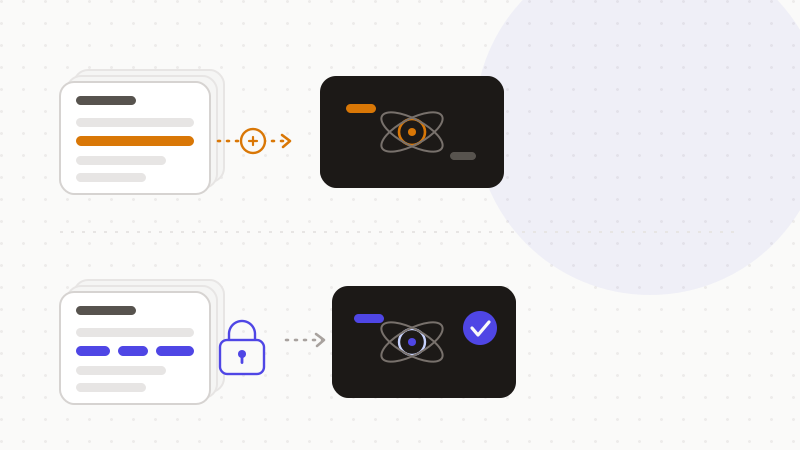
Anonymising is the highest-leverage step. Replace each client name, email or key with a reversible token before the text lands on a page. The AI reasons about the structure. It never sees the real values. You restore them locally when you need them.
That's what ONYRI Sanitize is for. The engine spots sensitive data — client names, emails, contract terms, API keys — and replaces it with reversible tokens. Detection and the mapping stay in your browser. Only anonymized text moves onward. Your team keeps the speed of workspace AI, while the data you're accountable for as a controller stays under your control.
Frequently asked questions
- Is Notion AI safe with your data?
- For most teams, yes — with governance. Notion AI reads your workspace content and passes it to subprocessors like OpenAI and Anthropic to generate answers. Notion states it does not use your data to train models by default, and it lists its subprocessors. But under the GDPR you remain the data controller. So the safe path is to govern AI-readable pages, anonymise client identifiers, and check the DPA.
- Does Notion AI train on my company data?
- Notion states that by default, Notion and its AI subprocessors do not use Customer Data to train any models, and that its contracts prohibit such use. This is Notion's own stated position, not an independent audit, and the wording can change. Re-check Notion's current security page, and keep truly sensitive content off AI-readable pages regardless.
- Who is responsible for personal data in our Notion workspace?
- You are. Under the GDPR, the organisation that decides why and how personal data is processed is the data controller. Notion is a processor, and its model providers are further subprocessors. GDPR Article 28 requires a contract and controls that chain. Signing the DPA and reviewing the subprocessor list are your duties, not the vendor's.
Sources & references
- Notion AI — data & security practices (training stance, subprocessors Anthropic/OpenAI, retention, SOC 2 / ISO 27001) — Notion
- Regulation (EU) 2016/679 (GDPR) — consolidated text, incl. Article 28 on processors — EUR-Lex (Publications Office of the EU)
- Controllers and processors — who is responsible under the UK GDPR — Information Commissioner's Office (ICO)
Keep your sensitive data in your browser
ONYRI Sanitize detects and masks your sensitive data before it reaches the AI, then restores the answer — from names to API keys.