Are AI Agents Safe With Your Data?
AI agents get access to your accounts and act on your behalf. The real risks: broad permissions and prompt injection. Here is how to stay safe.
Yes, but only if you keep them on a short leash. An AI agent is not a plain chatbot. It gets access to your email, calendar, files and accounts. And it can act for you, across many steps. Whatever you connect, it can read. That content is then sent to the model provider to reason over. Two risks stand out. Broad permissions let one agent read a whole inbox. And prompt injection lets a hidden instruction hijack it. The fix has one name: least-privilege. Grant the narrowest access, keep a human approval step, and anonymise sensitive inputs before you send.
What an AI agent actually is
Start with the difference. A chatbot answers. An agent acts. You give it a goal, and it runs the steps on its own. It can browse the web, read your files and send messages. To do that, it needs access and permissions to your accounts. That shift — from answering to acting — changes the whole risk profile.
Agents come in many shapes. An AI browser that clicks through pages for you. A browser extension that reads what is on screen. A meeting assistant that joins your calls. Each is a narrower case of the same idea. All of them get access. And all of them send what they see to a model.
The core risk: too many permissions
Here is the heart of it. Whatever an agent can reach, it can read. Connect it to your whole inbox, and it reads every message. Connect it to your drive, and it reads every file. Over-permissioning is the core data risk. The scope you grant decides what can leak.
And it does not stay local. Whatever the agent reads is sent to the model provider to reason over. So a broad scope is not just access. It is a pipe from your private data to an outside system.
- Your full inbox: every message, thread and attachment.
- Your calendar: who you meet, when, and about what.
- Your files: contracts, exports and working notes.
- Your connected accounts: anything the login unlocks.
Prompt injection: the signature threat
Now the signature threat. It is called prompt injection. OWASP ranks it as LLM01: the number-one security risk for LLM (large language model) applications. A crafted input makes the model follow an attacker's instructions instead of yours. The catch: the input does not have to be visible. Hidden text a person cannot see still counts, as long as the model reads it.
OWASP splits it in two. Direct injection sits in your own prompt. Indirect injection hides in a web page, an email or a document the agent reads. That second kind is the danger for agents. A malicious page can carry orders that hijack your assistant — to leak your data or act against you.
Excessive agency: when actions are hard to undo
Injection gets worse when the agent can act. OWASP lists that separately as Excessive Agency, LLM06. It is the risk of giving a system too much power — too many permissions, tools, or the ability to act — without adequate controls. A hijacked agent that only reads is bad. A hijacked agent that can also send, delete or buy is far worse.
Autonomous actions are also hard to review or reverse. An agent can send an email, delete a file or place an order in one step. You may not see it happen. And you may not be able to undo it. That is why a human approval step matters so much.
How to stay safe: least-privilege
The fix has a name: least-privilege. Grant the narrowest access the task actually needs. This is also the law's logic. The ICO enforces a data-minimisation principle. It is Article 5(1) of the UK GDPR, the UK version of the GDPR. It says personal data must be limited to what is necessary. The same principle sits in EU GDPR. Connect the smallest scope you can, and there is far less to leak.
- 1Review exactly what the agent connects to, and grant the narrowest scope.
- 2Keep agents away from your most sensitive accounts and inboxes.
- 3Require a human approval step before any send, delete or purchase.
- 4Prefer tools that show and log what the agent did.
- 5Anonymise sensitive inputs before they reach the agent or the model.
The NCSC gives matching advice. Limit the powers you grant to agents. Treat their output with skepticism, and double-check it. For teams, it recommends logging the full input and output of the model, plus every tool call, with live monitoring. The same rule covers the narrower cases: AI browsers, extensions and meeting assistants.
| Risk | What it means | The least-privilege fix |
|---|---|---|
| Broad scopes | The agent reads everything you connect | Grant the narrowest scope, per task |
| Prompt injection (LLM01) | Hidden instructions hijack the agent | Filter inputs, keep it from sensitive accounts |
| Excessive agency (LLM06) | The agent can act, not just read | Require human approval for any action |
| Hard to undo | Actions are difficult to review or reverse | Prefer tools that show and log every step |
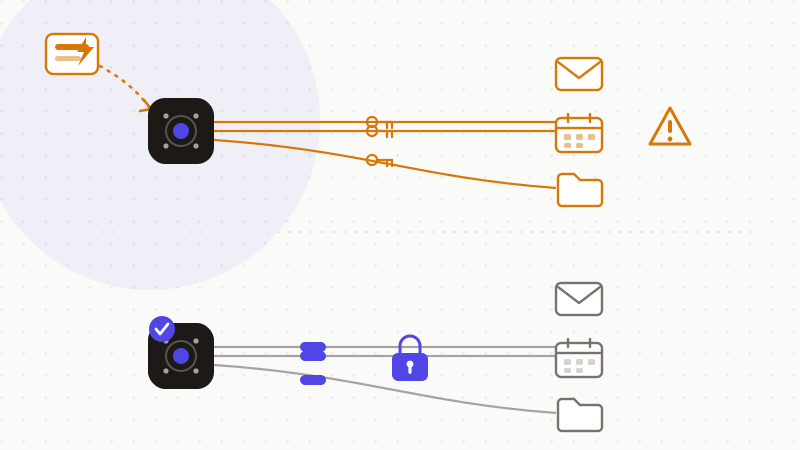
You can keep the help and cut the exposure. Send the agent less. Anonymise the sensitive parts before they leave your device. The agent still reasons about your task. It just never sees the real values.
That's where ONYRI Sanitize fits. The engine detects sensitive data — names, emails, IBANs, API keys and more — and swaps it for reversible tokens before anything is sent. Detection and the mapping stay in your browser. The agent and the model see only tokens. You restore the real values locally, on the reply. It maps cleanly onto OWASP's 'filter the input' advice and the ICO's data-minimisation rule: less raw data reaches the agent, so less can leak.
Frequently asked questions
- Are AI agents safe with your data?
- They can be, with least-privilege. An AI agent gets access to your email, calendar, files and accounts, then acts on its own. The two big risks are broad permissions and prompt injection. Grant the narrowest scope, keep a human approval step, and anonymise sensitive inputs before they reach the model. That is how you keep the help without the exposure.
- What is prompt injection in an AI agent?
- Prompt injection is OWASP's number-one LLM risk (LLM01). A hidden instruction inside a web page, email or document tricks the agent into following an attacker instead of you. It can make the agent leak your data or act against you. It is worse when the agent can also act — what OWASP calls excessive agency. Filter inputs and require human approval to reduce it.
- How do I limit what an AI agent can access?
- Use least-privilege. Review exactly what the agent connects to, and grant only the scope the task needs. Keep it away from your most sensitive accounts. Require approval before any send, delete or purchase. Prefer tools that show and log what the agent did. And anonymise sensitive data before it reaches the agent — this echoes the ICO's data-minimisation principle.
Sources & references
- LLM01:2025 Prompt Injection (number-one LLM application risk; direct vs indirect injection; layered mitigations) — OWASP Gen AI Security Project
- Mistaking AI vulnerability could lead to large-scale breaches (prompt injection hard to fix, limit agent powers, log everything) — UK National Cyber Security Centre (NCSC)
- Principle (c): Data minimisation (Article 5(1) UK GDPR — data limited to what is necessary) — UK Information Commissioner's Office (ICO)
Keep your sensitive data in your browser
ONYRI Sanitize detects and masks your sensitive data before it reaches the AI, then restores the answer — from names to API keys.