Are AI Translation Tools Safe for Confidential Documents?
Yes — confidential documents pasted into a free AI translator have already ended up publicly on Google. Why it happens, and the fix that covers the content.
Not by default: pasting a confidential document into a free consumer AI translator isn't safe. In 2017, employees of the Norwegian oil company Statoil discovered that texts translated through the free service Translate.com were indexed by Google and accessible to anyone running a search — contracts, dismissal letters, emails. The cause: many free tools store and reuse the submitted text, and their terms of service grant a broad license over it. Professional tiers (APIs, paid subscriptions) are generally zero-retention, but the only guarantee is to anonymize the document before translating it.
The day translated contracts showed up in Google
On 3 September 2017, Norway's public broadcaster NRK revealed that texts run through the online service Translate.com were surfacing publicly in Google search results. Statoil employees found sensitive documents there that they had assumed were confidential. The mechanism: Translate.com relied on cloud storage of submitted texts so that volunteer human translators could review them and improve quality — those texts were then indexed by search engines. In response, the Oslo Stock Exchange blocked its employees' access to the service. That's the clear answer to the question: yes, confidential data pasted into a free translator has already ended up publicly indexed.
| Date | Incident | What leaked | The lesson |
|---|---|---|---|
| 3 Sep 2017 | NRK reveals the Translate.com affair | Translated texts indexed and reachable via Google | A free translator is not a private vault |
| Sep 2017 (Statoil) | Employees find their documents online | Contracts, dismissal letters, doctor/pharma emails | Pasted content leaves your perimeter of control |
| Response | Oslo Stock Exchange blocks access to the service | — | Organizations treat these tools as a security risk |
Why free tools keep (and reuse) your text
A free consumer translator sends your text to cloud infrastructure you don't control, and its terms of service often grant broad use of it. Google's terms of service — which apply to the free public version of Google Translate — grant Google a worldwide license to host, store, reproduce, modify and create derivative works from submitted content in order to operate and improve its services. DeepL similarly distinguishes its two tiers: the Free version reserves the right to process, for a limited time, submitted texts in order to train and improve its neural networks (see its terms of use and the DeepL Pro Data Security page). Pasting a confidential document into these tools therefore moves it beyond your control.
- Storage: the text is sent and kept on third-party servers, sometimes to be reviewed by humans.
- Reuse: depending on the terms, it can be used to train or improve the translation models.
- Indexing: poorly secured cloud storage can, as in 2017, end up exposed to search engines.
- Uneven security: the European Commission notes that many free tools offer neither encryption nor robust data protection.
Consumer vs. pro: the difference is real
Not all translators are equal. For the Cloud Translation API (a paid offering), Google officially states that it does not use submitted content to train or improve its translation features, does not retain the text persistently (it's held briefly, just long enough to produce the translation), claims no ownership over it, and neither shares nor makes it public — a policy that concerns the API, not the consumer widget. For its part, DeepL's Pro version doesn't keep texts long-term, deletes texts and translations after the service runs, and doesn't use them to improve quality (see DeepL Help Center, infrastructure and data protection). Good hygiene: favor a platform with a zero-retention policy, ideally encrypted and certified (ISO 27001, SOC 2).
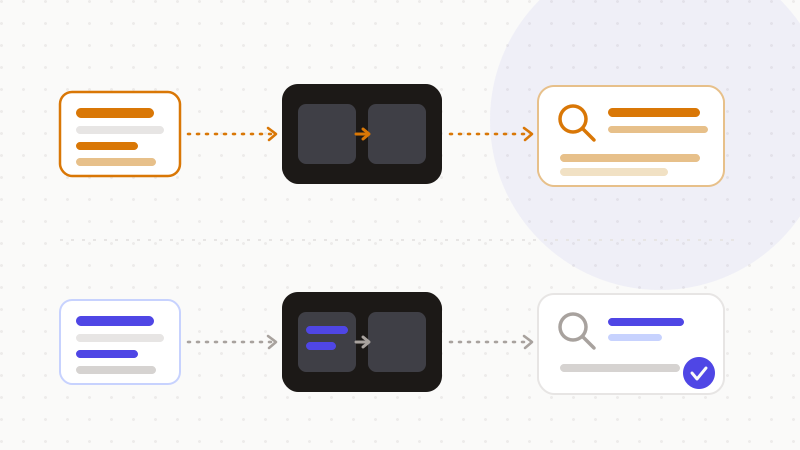
The fix: anonymize the document before translating
Since a translator's terms and retention aren't under your control, the only guarantee is about the content: if the document contains no sensitive data in the clear, then cloud storage, accidental indexing or a human reviewer expose nothing usable. The steps are simple:
- 1Spot the sensitive items: names, identifiers, amounts, contact details, internal references.
- 2Replace them with reversible tokens before sending the text to the translator.
- 3Translate the neutralized text — the tool only sees tokens, never the real information.
- 4Restore the original values in the translation, in your browser.
That's exactly what ONYRI Sanitize is for: the engine replaces names, identifiers, amounts and contact details with reversible tokens, and only that anonymized text reaches the translator. Detection and the token↔value mapping stay in your browser — they never leave it. Whatever the translator's terms, whether it stores, reuses or indexes the text, it only finds tokens, not your real information.
Frequently asked questions
- Are Google Translate or free AI translators safe for confidential documents?
- Not by default. The free consumer version sends your text to a third-party cloud, and its terms of service grant a broad license over it; in 2017, documents run through a free translator were even indexed by Google. For confidential documents, anonymize the content before translating, or use a zero-retention pro offering.
- What's the difference between a translator's free version and its pro tier?
- The pro tier is generally zero-retention: for Google's Cloud Translation API, text is neither kept long-term, used for training, nor shared; DeepL's Pro version deletes texts and translations after the service runs. The free consumer version, by contrast, can keep and reuse text to improve its models.
- How can I translate a confidential document without exposing it?
- Anonymize it before submitting: replace names, identifiers, amounts and contact details with reversible tokens, translate the neutralized text, then restore the original values in your browser. The translator never sees the real information, whatever its terms of service.
Sources & references
- Enquête sur l'exposition de données très sensibles via Translate.com (affaire Statoil, septembre 2017) — Slator
- Politique officielle d'utilisation des données de l'API Cloud Translation (pas d'entraînement, pas de stockage persistant, pas de partage) — Google Cloud Documentation
- Confidentiel ? Pas du tout ! Pourquoi votre outil de traduction stocke secrètement vos données — Commission européenne — Knowledge Centre on Translation and Interpretation
Keep your sensitive data in your browser
ONYRI Sanitize detects and masks your sensitive data before it reaches the AI, then restores the answer — from names to API keys.