How to Train Your Team to Use AI Safely
Your team already uses AI. Train and equip them: a short charter, simple rules, and anonymisation before every prompt.
Your team already uses AI. Often off the radar, on personal accounts, with company data. This is "shadow AI": the use of tools like ChatGPT without IT approval. Banning it does not remove the usage. It pushes it into the shadows, where you no longer see it. The right answer has two parts. Train your team on simple rules. And give them a tool that makes the safe path the easiest one. This guide shows you how.
The real problem: shadow AI, not AI itself
Let's name the problem first. Your people want to move faster. AI helps them do that. So they use it, with or without your approval. That is shadow AI.
Recent surveys on the topic agree. A large majority of employees use unapproved AI tools at work. And many hide that usage from their managers. The problem is not the tool. It is what people feed it.
Many leaks stem from a simple lack of knowledge. One person pastes a contract into an AI. Another uploads a payslip, a CV, a client file. Without realising it, they disclose personal data outside the company's controlled perimeter.
The stakes: what the GDPR says about your data
Pasting a client file into an AI is not a harmless move. It is processing of personal data. And the GDPR governs every processing operation.
The key principle is called minimisation. Article 5.1.c of the GDPR states it plainly. You must process only the data strictly necessary for your purpose. The practical question is simple. Do I really need this identifying data to get my answer? Most of the time, no.
The CNIL, France's data protection authority, points the same way. In its practical AI fact sheets, it gives good practices for selecting data and limiting its processing. It also reminds that the people concerned must be informed. Minimisation is not an abstract constraint. It is the first reflex to pass on to your team.
The solution: train AND equip
The CNIL is clear on the first building block. It recommends raising awareness among all employees about data protection. Good reflexes must be shared across every department, not just IT. It adds that employers can offer training to learn how to use AI with the right reflexes.
Which reflexes, concretely? According to the CNIL, they come down to three moves. Anonymise data before submitting it. Check the answers produced. Know the risks, such as inputs being reused for training. Here are the rules to pass on, in plain terms.
- Never paste client data, identifiers or technical secrets into an AI.
- Anonymise sensitive data BEFORE writing the prompt, never after.
- Use only the tools approved by the company.
- Check every AI answer before acting on it.
- When in doubt about a piece of data: do not paste it.
These rules are sound. But training alone fades. Three months later, vigilance drops. That is where the second building block comes in: the tool.
The method in 5 steps
Here is a simple plan to roll out safe AI use across your team. It fits in five steps.
- 1Write a clear short charter: one page, readable rules, not a legal wall of text.
- 2Give concrete examples of what you never paste: a contract, a payslip, a client file.
- 3Deploy a tool that anonymises automatically, so security no longer depends on each person's vigilance.
- 4Name a point person, a clear contact when in doubt.
- 5Schedule regular reminders to keep the reflexes alive.
| Approach | What it covers | Its limit |
|---|---|---|
| Ban AI | Nothing: usage continues on personal accounts | Moves the risk out of your sight |
| Train only | The right reflexes, in the moment | Fades; relies on each person's vigilance |
| Train AND equip | The reflexes + an automatic barrier before sending | Requires choosing the right tool |
Why the tool changes everything
Let's return to step 3, the most decisive one. Training asks every employee to remember to anonymise. On every prompt. On a rushed day, the slip happens. The tool never gets tired.
A tool that masks sensitive data before sending makes the good practice automatic. Security no longer rests on anyone's memory. It is built into the action.
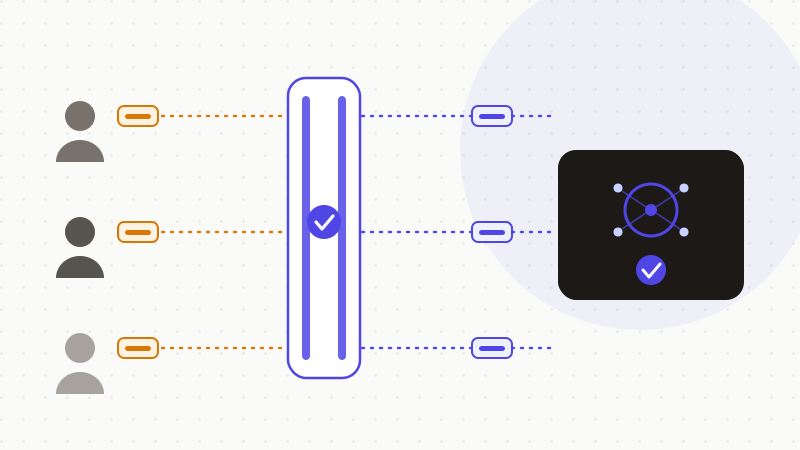
This is exactly what ONYRI Sanitize does. The engine detects sensitive data — names, client files, identifiers, API keys, technical secrets. It replaces them with reversible tokens before sending. Detection and the mapping stay in the browser. Only anonymised text reaches the model. The real values never leave the workstation.
For a team, this fixes the most fragile point. Your people use whatever AI they like. But the anonymisation barrier applies to everyone, the same way. Security no longer rests on each person's vigilance. ONYRI's Team tier is built for this collective rollout: same rules, same protection, for the whole team.
Training your team stays essential. But training alone fades. By pairing it with a tool that anonymises before sending, you turn a good intention into an automatic reflex. That is what ONYRI Sanitize is for: making the safe path the easiest one, so your team can benefit from AI without ever exposing your most sensitive data.
Frequently asked questions
- How do you train your team to use AI safely?
- In two parts: train and equip. First, pass on simple rules — never paste client data or identifiers, anonymise before the prompt, use approved tools. The CNIL recommends raising awareness among all employees and offering training on the right reflexes. Then, pair the training with a tool that anonymises automatically, so security does not rest on each person's vigilance.
- Should you ban AI at work?
- No, banning does not work. It does not remove the usage, it pushes it off the radar, onto personal accounts: that is shadow AI. You then lose all control. The effective path is the opposite: make safe use simpler than risky use, with clear rules and a tool that anonymises data before it is sent.
- What does the GDPR say about employees using AI?
- Pasting a file into an AI is processing of personal data, governed by the GDPR. The minimisation principle (Article 5.1.c) requires processing only the data strictly necessary. The CNIL also stresses that the people concerned must be informed. Using AI does not automatically require a DPO, but minimisation and informing people apply to any company.
Sources & references
Keep your sensitive data in your browser
ONYRI Sanitize detects and masks your sensitive data before it reaches the AI, then restores the answer — from names to API keys.