Does Grok Train on Your Data? (xAI Training & Opt-Out)
By default, yes: xAI can use your Grok chats to train the model. There's an opt-out — but turn it off and still anonymise sensitive data first.
Here's the short answer. By default, yes — Grok usually trains on your data. Grok is the AI assistant from xAI, Elon Musk's company. It is built into X, formerly Twitter. Under xAI's published policy, your interactions with Grok can be used to train and fine-tune the model. That covers your prompts, your inputs, and Grok's replies. On X, it can also cover your public posts. There is an opt-out, and you should use it. But a toggle is not a full guarantee. It does not erase past use. It also does not clean what you type. So turn it off, and still anonymise sensitive data before you paste.
Who makes Grok, and what counts as 'your data'
Grok is made by xAI, the AI company founded by Elon Musk. It sits inside X, the platform formerly known as Twitter. xAI's privacy policy generally allows it to learn from how people use Grok. For a normal consumer account, the honest answer is therefore usually yes. Terms change often. Check the policy in force for your account.
In practice, 'your data' covers several things.
- Your prompts — the questions and text you send to Grok.
- Your inputs — files or details you add to a chat.
- Grok's responses — the content generated in your conversation.
- On X, your public posts — what you share openly on the platform.
The opt-out exists — here is where to look
A setting lets you switch this off. Its place and label have moved over time. They also differ across grok.com, the Grok app, and X. On the Grok product, look under Settings, then Data Controls. On X, look under Settings and privacy, then Privacy and safety, then Grok. You are looking for a toggle about using your data for training, or 'improving the model'. Confirm the current wording in your own settings before you trust a screenshot.
Enterprise tiers, and the EU story
Business plans often work differently. Enterprise and API tiers commonly carry stricter commitments than the open chatbot. They may not train the model on customer inputs. But these terms vary and change. So check the specific agreement rather than assume.
The European Union raised a flag in 2024. Ireland's Data Protection Commission, the Irish DPC, took X to the High Court. On 8 August 2024, the DPC welcomed X's agreement to suspend some processing. This concerned the public posts of EU and EEA users. Those posts, collected between 7 May and 1 August 2024, had been used to train Grok. In September 2024, the case was struck out after X agreed to keep those limits. Treat this as a 2024 snapshot, not a permanent promise for all future processing.
Regulators have also set the general rules for AI training. The UK's Information Commissioner's Office, the ICO, accepts 'legitimate interests' as a basis to train a generative AI. But only if it passes a three-part test, including a balancing test against people's rights. The company must also build real ways for people to object. France's CNIL takes a similar line. It stresses that the right to object under the GDPR must stay genuinely easy to use. These are general positions, not rulings about Grok in particular.
What the toggle does not do
Turning the opt-out off is worth doing. But be clear about its limits. It only stops future use. Data already fed into training cannot be pulled back out of the model. A default settings change could also flip it back later. And crucially, it does nothing to the content you type. The toggle controls training. It does not hide the names, client details, or API keys inside your message.
| The toggle… | But… |
|---|---|
| Turns off future training on your chats | Cannot erase what was already used in the model |
| Can be switched on and off | May be reset by a later default settings change |
| Decides whether your data is used | Does not anonymise the sensitive data you type |
| Applies to your account settings | Enterprise and API terms may differ — check the agreement |
The fix: anonymise before you paste
The durable fix is simple. Do not paste sensitive data into a consumer AI. Keep names, client details, credentials, and API keys out of the prompt. Ask Grok your real question, but without the sensitive parts. The best way: anonymise the text before you send it.
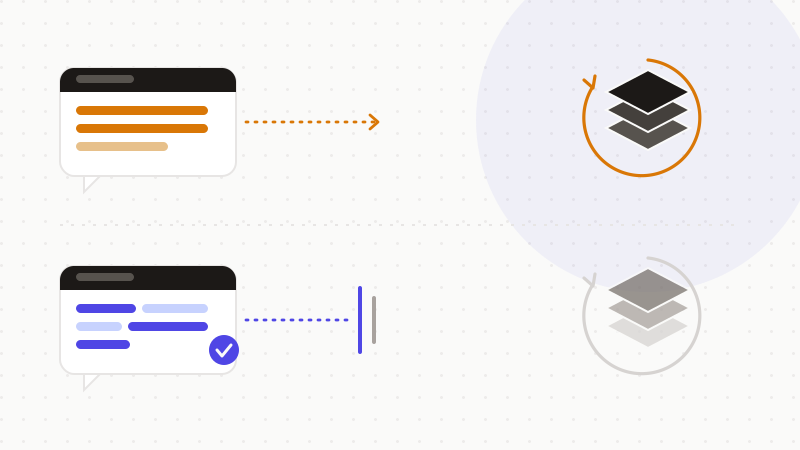
When you must include a concrete detail, replace it first. Swap each sensitive value for a token. Grok reasons about the shape of your case, without seeing the real data. You restore the real values afterwards, on your own machine.
- 1Spot the sensitive parts: names, client details, credentials, API keys.
- 2Replace them with reversible tokens, in your browser.
- 3Send only the anonymized text to Grok.
- 4Restore the real values in the reply, locally.
That's what ONYRI Sanitize is for. The engine detects sensitive data — names, client details, credentials, API keys — and swaps it for reversible tokens before you send. Detection and the mapping stay in your browser. Only anonymized text reaches Grok. So even if a setting changes, or your data lands in a training set, the model only ever sees tokens. You get the answer, without handing over what you can never take back.
Frequently asked questions
- Does Grok train on your data?
- By default, usually yes for consumer accounts. xAI's policy generally allows your Grok interactions — prompts, inputs, and replies — plus your public X posts to be used to train and fine-tune the model. There is an opt-out you can switch off. But it only stops future use, and it does not clean what you type. Anonymise sensitive data before you paste.
- How do I stop Grok from training on my data?
- Look for the data-sharing setting in your settings. On the Grok product it sits under Settings, then Data Controls. On X it sits under Settings and privacy, then Privacy and safety, then Grok. Switch off the option about using your data for training. The wording changes over time, so confirm it in your own live settings.
- Did the EU stop Grok from training on user data?
- Partly, and within a specific window. In 2024 Ireland's Data Protection Commission, the Irish DPC, challenged X's use of EU and EEA public posts to train Grok. On 8 August 2024 the DPC welcomed X's agreement to suspend that processing. The case was struck out in September 2024 after X agreed to keep the limits. Treat it as a 2024 outcome, not a blanket permanent ban.
Sources & references
- The DPC welcomes X's agreement to suspend its processing of personal data for training the AI tool 'Grok' — Irish Data Protection Commission (DPC)
- Engineering individual rights into generative AI models (lawful basis, three-part test, right to object) — Information Commissioner's Office (ICO)
- Elon Musk's X agrees to pause EU data processing for training Grok — TechCrunch
Keep your sensitive data in your browser
ONYRI Sanitize detects and masks your sensitive data before it reaches the AI, then restores the answer — from names to API keys.