Are AI Meeting Assistants Safe? (Otter, Fireflies, and More)
Not by default: Otter.ai, Fireflies.ai and meeting bots record and transcribe everything, training often on. The real privacy risks and the fix.
Not by default: an AI meeting assistant like Otter.ai, Fireflies.ai or a bot that joins your call records, transcribes and stores everything said — including confidential information: numbers, HR topics, client data and trade secrets. On consumer tiers, training on transcripts is often on by default, and several class actions filed in 2025 accuse these tools of recording and exploiting conversations without clear consent. They can be used safely, but on specific terms — and the only content-level guarantee is to send an AI summary only an anonymized transcript.
What an AI meeting assistant actually captures
These tools automatically join Zoom, Google Meet or Microsoft Teams to record, transcribe and analyze the meeting. The issue isn't transcription itself but what flows through it: a bot doesn't sort a harmless agenda point from a confidential exchange. Everything goes — the margin on a deal, an HR case, client data, a technical key read aloud. The complaints against Otter.ai even describe a case where the bot kept listening after the meeting officially ended: the transcript, then sent automatically by email, contained confidential remarks exchanged once the meeting was closed, contributing to a deal falling through. Those transcripts and follow-up emails are sometimes sent to participants — or even to invited-but-absent people — without them having an account with the provider.
The Otter.ai and Fireflies.ai lawsuits
This isn't theoretical: it's now before U.S. courts. A federal class action (Brewer v. Otter.ai Inc., U.S. District Court, Northern District of California) filed on August 15, 2025 accuses Otter.ai of recording conversations deceptively and surreptitiously and exploiting that data to train its transcription service without participants' permission — the real-time service allegedly doesn't ask their consent to recording by default, nor warn them that recordings are used to improve its AI systems. The litigation has since expanded: four suits filed between August and September 2025 were consolidated as In re Otter.AI Privacy Litigation. Per the complaints, training on transcripts is enabled by default on consumer tiers, gated behind a checkbox many users tick without understanding they're authorizing the ingestion of private conversations for training.
Fireflies.AI faces a separate proceeding: a class action filed in November 2025 in Illinois (plaintiff Katelin Cruz) invokes the Biometric Information Privacy Act (BIPA). It alleges the “Speaker Recognition” feature generates voiceprints without publishing a retention schedule, without informing participants in writing of the collection, its purpose and duration, and without obtaining written consent — including from people merely present in a meeting who never created an account or accepted the terms of service. For configuration details, refer to the official “Otter.ai Privacy Policy / Notebook” and “Fireflies.ai Security & Privacy” pages.
Consent and GDPR: a real legal risk
Recording a meeting without agreement creates a legal risk that varies by jurisdiction. In the U.S., the federal rule is one-party consent, but about a dozen states (California, Illinois, Florida, Maryland, Massachusetts, Pennsylvania, Washington…) require all-party consent. The prudent rule: if a single participant is in an “all-party” state, you need everyone's agreement. Under the GDPR (and the CCPA/CPRA in California), voice recordings and their transcripts are personal data: you need a legal basis, transparent information (purpose, access, retention period) and unambiguous consent before recording. Voiceprints additionally fall under biometric data laws like BIPA, which require explicit written consent.
| Consent rule | Where it applies | What it implies |
|---|---|---|
| One-party | Default U.S. federal rule | A single participant can authorize recording |
| All-party | ~12 U.S. states (CA, IL, FL, MD, MA, PA, WA…) | Every participant's agreement required |
| Unambiguous consent | GDPR (EU), CCPA/CPRA (California) | Legal basis + transparent notice before recording |
| Explicit written consent | BIPA and biometric laws (voiceprint) | Written notice + signed agreement for the voiceprint |
Beyond consent, some meetings capture legally protected or privileged exchanges: medical discussions, union activity, harassment complaints, attorney-client communications. Firms recommend banning AI notetakers in these categories.
Using these tools without exposing data
An AI meeting assistant isn't to be banned on principle; it's to be governed. The measures recommended to reduce the risk:
- 1Establish explicit consent: written notice in the invite, an active consent prompt, and a verbal announcement at the start of the meeting.
- 2Restrict by jurisdiction and meeting type (never a bot on attorney-client privilege, executive conversations or health data).
- 3Disable high-risk features (speaker recognition / voiceprint if you don't need them).
- 4Strictly control data retention at the provider, and vet its guarantees.
- 5For AI summaries, send an external model only an anonymized transcript — not the raw verbatim.
- Consent reduces legal risk, but doesn't protect the content once transcribed.
- Disabling sensitive features limits collection, not what was already captured.
- Only anonymizing the transcript neutralizes the content itself before an AI summary.
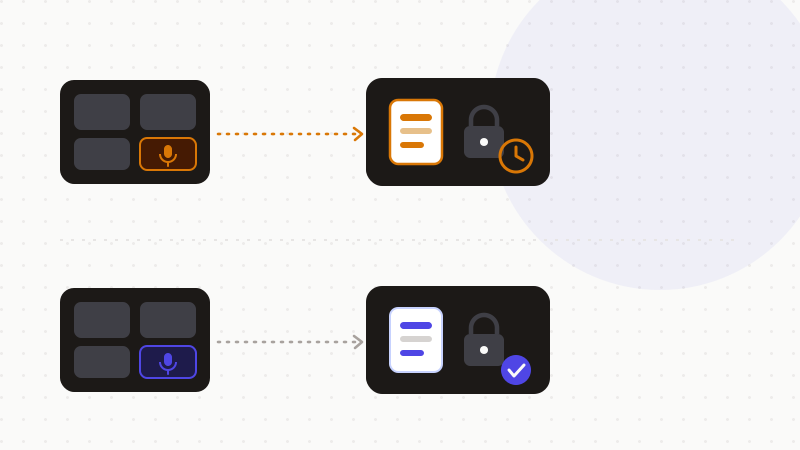
This is where it dovetails with your meeting-notes process: we cover the how-to side in “AI meeting notes without exposing confidential data.” The shared idea is simple — let the bot record if consent is in order, but hand the summary model only a transcript already cleaned of its identities, amounts and secrets.
That's exactly what ONYRI Sanitize is for: the engine replaces names, amounts, client data and keys with reversible tokens before sending; detection and the token↔value mapping stay in your browser, and only anonymized text reaches the summary tool. Whether the transcript is reviewed, retained or used for training, it only finds tokens — not your real information.
Frequently asked questions
- Are AI meeting assistants safe?
- Not by default: Otter.ai, Fireflies.ai and meeting bots record and transcribe everything, and training on transcripts is often on by default on consumer tiers. Class actions filed in 2025 allege they record without clear consent. They can be used safely provided you govern consent and send AI summaries only an anonymized transcript.
- Is it legal to record a meeting with an AI bot without telling anyone?
- It depends on jurisdiction. In the U.S., the federal rule is one-party consent, but about a dozen states require all-party consent; if one participant is there, you need everyone's agreement. Under the GDPR, you need a legal basis, transparent information and unambiguous consent before recording; voiceprints additionally require written consent (BIPA).
- How do I use an AI meeting assistant without exposing confidential data?
- Establish explicit consent, restrict bots by meeting type, disable high-risk features like voiceprints, and above all send an AI summary only an anonymized transcript: an engine replaces identities, amounts and secrets with reversible tokens, and the model never receives the real verbatim.
Sources & references
- Class action accusing Otter.ai of secretly recording private work conversations and training its AI on them — NPR
- Legal analysis of the AI notetaker litigation: all-party consent, captured confidential content, and 7 steps for businesses — Fisher Phillips LLP
- Lawsuit against Fireflies.AI: alleged collection of biometric voiceprints in meetings without written consent (BIPA, Illinois) — The National Law Review
Keep your sensitive data in your browser
ONYRI Sanitize detects and masks your sensitive data before it reaches the AI, then restores the answer — from names to API keys.