Is Meta AI Safe on Messenger? The Encryption Nuance
On Messenger, your personal chats are encrypted by default. But a message to Meta AI leaves the envelope and goes to Meta. Here is the line.
Yes, with a nuance that changes everything. On Messenger, your personal chats are end-to-end encrypted by default. Meta states their content is visible only to the sender and the recipient, “not even Meta”. So your private chats are protected, just like on WhatsApp. But Meta AI is the exception. When you write to the assistant, or when you tag it, that message leaves the encrypted envelope. It goes to Meta. The rule is simple: talking to Meta AI means writing to a company, not to a friend.
On Messenger, your personal chats are encrypted by default
Start with the good news, because it is solid. In December 2023, Meta launched default end-to-end encryption on Messenger. It covers personal chats and calls, on Messenger and Facebook. End-to-end encryption, often written E2EE, protects the content between the sender and the recipient. Meta builds it on the Signal Protocol and its own Labyrinth Protocol. Meta states that once a chat is encrypted, its content is visible only to the participants, “not even Meta”. The rollout took time, and Meta later described it as complete. Today it is the default behaviour for personal chats.
This “by default” has limits, and Meta lists them. Chats with businesses are not covered. Marketplace conversations are not covered either. For group chats, encryption stays optional, not automatic. So the default applies to ordinary personal chats. Note a useful contrast with Instagram. On Instagram, direct-message encryption is a setting you have to turn on. On Messenger, it is on by default.
Meta AI is the exception to the encrypted envelope
Here is the heart of it. Meta AI is a deliberate exception to the encryption. Per Messenger's help centre, writing to Meta AI shares that message with the assistant. Tagging “@Meta AI”, or replying in a way that tags it, does the same. That message is then shared with Meta AI. Even inside an end-to-end encrypted thread, Meta says it can access that message. Its Privacy Policy and the Meta AI Terms of Service describe this. The rest of the conversation stays encrypted. But the message addressed to the assistant leaves it.
| You assume | The reality (per Meta) |
|---|---|
| “All of Messenger is encrypted, so the AI is too” | Default encryption covers personal chats, not messages to Meta AI |
| “Writing to Meta AI is still end-to-end encrypted” | No. That message is shared with Meta AI and can be read by Meta |
| “Tagging the AI in a group only exposes me” | The tagged message is disclosed to Meta on behalf of the whole thread |
| “Messenger and Instagram are the same” | On Messenger encryption is the default; on Instagram it is optional |
Tagging Meta AI in a group involves everyone
Here is a point almost nobody spells out. In a group, Meta says Meta AI only reads the message that tags it. It does not read the rest of the conversation. That is reassuring about scope. But the practical result is clear. Tagging the assistant discloses that message to Meta on behalf of the whole thread. One person's tag exposes content shared by several.
- Meta says the AI reads only the message that tags it, not the others.
- That tagged message is indeed sent to Meta, outside the encryption.
- One person decides, for a conversation that belongs to several.
- If the message quotes what another member just wrote, that goes too.
Meta AI cannot be fully removed from the apps. You can, however, avoid invoking it and turn off per-chat message sharing. We cover that setting separately, along with the question of what Meta AI can see of your photos.
What Meta does with your messages: two threads to keep apart
Two different things get mixed up. The first is about the messages you send to Meta AI. Meta says it can retain them and use them to improve its service. Meta also states it removes certain personal identifiers before that use. Present this as Meta's claim, not as an independent guarantee. You can also turn off message sharing for a given chat.
The second thread is distinct, and it does not touch your private chats. Meta uses public content from adult Facebook and Instagram accounts to train its AI models. This means public posts and comments, not your private messages. Per the Irish Data Protection Commission, the DPC, Meta notified it in March 2024. The project was paused in June 2024 after complaints. It resumed on 27 May 2025, with safeguards. Meta added an objection form, easier to use and available for longer, for people in the EEA (the European Economic Area) and the UK. Meta says it does not use private messages, EU under-18 accounts, or the data of people who object. Keep the distinction in mind: your private Messenger chats are not part of that training set. We cover the question “does Meta AI train on your data” separately.
How to use Meta AI on Messenger without putting yourself at risk
The assistant is genuinely useful. It can summarise, rewrite, translate, explain. None of that requires a client name, a salary or a diagnosis. The right reflex happens before you send, not after. The behaviour matches WhatsApp and Instagram: talking to Meta AI takes the content out of encryption. Here is the method.
- 1Treat every message to Meta AI as a message to a company.
- 2Strip names, amounts, health details and credentials from the prompt.
- 3Do not tag the assistant in a private group without thinking it through.
- 4Turn off message sharing on the threads you want kept away.
- 5Anonymise the text before you send, then restore the real values on your side.
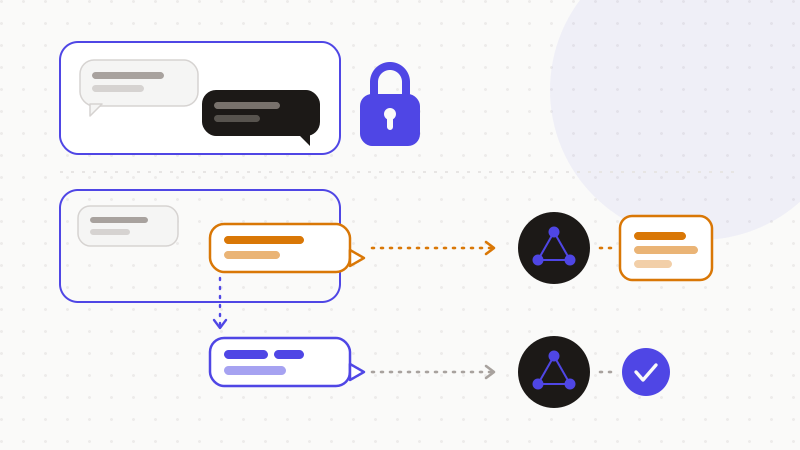
The last step matters most, and it is the easiest to automate. You do not have to choose between AI help and privacy. You only have to stop sensitive data from leaving in the prompt.
That is what ONYRI Sanitize is for. The engine detects sensitive data in your text — names, contact details, amounts, identifiers, technical secrets — and replaces it with reversible tokens. Detection and the mapping stay in your browser. You then copy anonymized text, into Messenger or anywhere else. The assistant works on tokens, never on your real values. You restore the original on your side. The nuance in this article then becomes harmless: even the message you address to Meta AI holds nothing sensitive.
Frequently asked questions
- Is Meta AI safe on Messenger?
- Yes for your personal chats, with a clear caveat for the assistant. Your personal chats stay end-to-end encrypted by default, and Meta states that not even Meta can read them. But Meta AI is the exception: writing to it, or tagging it in a thread, shares that message with Meta, even inside an encrypted chat. So treat every prompt as a message to a company, and keep sensitive data out of it.
- Are my Messenger chats end-to-end encrypted?
- Your personal chats have been by default since Meta's rollout that began in late 2023, built on the Signal Protocol and Meta's Labyrinth Protocol. Meta notes limits: chats with businesses and on Marketplace are not covered, and group encryption stays optional. It is a stronger default than Instagram, where direct-message encryption still has to be turned on.
- What happens if I tag Meta AI in a group?
- That specific message is shared with Meta. Meta says the AI only reads the message that tags it, not the rest of the thread. But that message leaves the encryption, and you take the decision on behalf of the whole group. Before tagging the assistant, look at what the message reveals about the other participants, and strip out any sensitive data.
Sources & references
- Launching Default End-to-End Encryption on Messenger (default end-to-end encryption, Signal and Labyrinth protocols) — Meta (About Meta newsroom)
- About sharing with Meta AI on Messenger (what is shared with Meta AI, including inside an encrypted thread and when tagged in a group) — Messenger Help Centre
- DPC statement on Meta AI (training on public Facebook/Instagram content: notification, pause, resumption and safeguards) — Irish Data Protection Commission (DPC)
Keep your sensitive data in your browser
ONYRI Sanitize detects and masks your sensitive data before it reaches the AI, then restores the answer — from names to API keys.