Is It Safe to Connect AI to Your Calendar?
Yes, with care: an AI calendar connector usually reads your whole schedule and every guest. Grant the narrowest scope and anonymise before you paste.
Yes, but with care. AI can summarise your day or draft an agenda. The trap is the permission. A calendar connector usually reads all your events, not one. Your calendar is a map of your life and your company. It shows who you meet, when, and about what. Event titles leak deals, your health or a job hunt. Attendee emails expose your whole network. The clean method: grant the narrowest scope, and anonymise an agenda before you paste it into a consumer AI.
Your calendar is a map of your life
A single meeting looks harmless. The full calendar does not. Stitched together, your events draw a precise portrait. Who you meet. How often. About what. A plain title says a lot.
- Live deals: a title like “Acme acquisition sync” reveals a confidential transaction.
- Your health: an “oncology appt” entry exposes very sensitive data.
- A job hunt: “interview - competitor” gives away your exit before you do.
- Your relationships: who you see and how often maps your private and working life.
Attendees add a layer. Every event carries names and emails. Added up, they map your whole network. Your clients, partners, candidates, and family. This is not only your data. It is theirs too.
The permission is broad, not targeted
This is the core problem. A calendar connector almost never asks for one event. It asks for access to the whole calendar. Google's OAuth documentation shows this plainly. The common read scope lets an app see and download any calendar you can access. The full scope goes further still: see, edit, share and permanently delete all your calendars.
In plain terms, granting that access hands the tool your entire schedule. And every attendee with it. The AI, and the provider behind it, see the whole thing. Not the single meeting you wanted summarised.
Google also classifies calendar access among its “sensitive” scopes. Those require extra review. Google advises developers to request the narrowest scope that still works. For example an event-only read, rather than full access. That is the principle of least privilege. The same logic applies to you when you approve an AI tool.
Third-party schedulers hold a standing key
Many “AI books your meetings” tools are small third parties. To act, they hold a standing OAuth token to your calendar and your contacts. That token keeps working. It stays active until you revoke it.
The National Cyber Security Centre (NCSC), the UK's cyber security agency, is clear here. Granting excessive permissions to a token raises the risk of data leakage or misuse. Access should be the bare minimum necessary for the task. That is a direct least-privilege argument against connectors that read the whole calendar.
The NCSC also warns about long-lived access keys. A compromised key then grants indefinite access. Many AI schedulers hold exactly this kind of standing token. It stays a target until you cut it off. So reviewing and revoking connected apps regularly matters.
Attendees are other people's data
Here is the point people forget. The attendees on your calendar are not your data. Their names and emails are other people's personal data. By connecting a tool that ingests your whole calendar, you share that data on their behalf.
The Information Commissioner's Office (ICO), the UK's data protection regulator, sets a clear principle. Data minimisation requires personal data to be adequate, relevant and limited to what is necessary for the purpose. Holding more than you need likely breaches that principle.
Apply that principle to your calendar. Giving an AI a standing read of every event to summarise one day runs against the idea. The task needs only one day. The connector, though, takes everything, attendees included.
| The action | What actually leaves |
|---|---|
| “Summarise my meetings tomorrow” | A standing read of the whole calendar, not just the day asked for |
| “A connector only sees one event” | The common OAuth scope grants access to the entire calendar |
| “These are my meetings” | Guests' names and emails are the personal data of other people |
| “The app keeps access just for the task” | The OAuth token stays active until you revoke it |
The fix: narrow scope and anonymisation
Good news: AI is still useful for your calendar. You just keep control. A few simple moves cut the exposure without giving up the tool.
- 1Grant the narrowest scope offered: an event-level read rather than access to the whole calendar.
- 2Keep sensitive events — health, legal, deals, interviews — off a connected calendar, or give them vague titles.
- 3Review and revoke the apps connected to your account regularly.
- 4Don't let an AI notetaker join a meeting without the participants' consent.
- 5Anonymise an agenda before you paste it into a consumer AI.
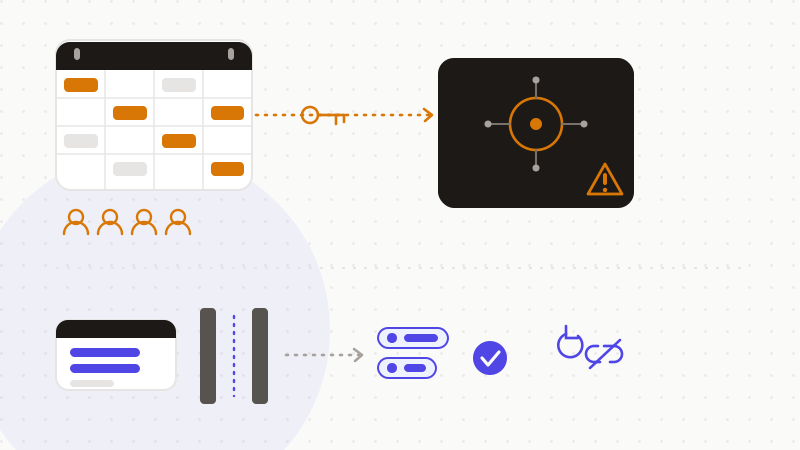
Anonymisation is the key to that last step. When you really must paste an agenda, replace the names, emails and sensitive titles with tokens first. The AI reasons about the shape of your meeting, without ever seeing the real values. You restore the originals afterwards, locally.
That's what ONYRI Sanitize is for. The engine detects sensitive data — names, guest emails, revealing titles — and replaces it with reversible tokens before sending. Detection and the mapping stay in your browser. Only anonymized text reaches the model. The AI finds only tokens, never your company's real schedule or your guests' network.
Frequently asked questions
- Is it safe to connect AI to your calendar?
- Yes, but with care. AI can summarise a day or draft an agenda. The risk is the scope: a calendar connector usually reads your whole calendar and every guest, not one event. Grant the narrowest scope, keep sensitive events off a connected calendar, and anonymise an agenda before you paste it into a consumer AI.
- Does an AI connector really see my whole calendar?
- Most often, yes. The common OAuth read scopes, documented by Google, grant access to the entire calendar, not a single event. So the AI and the provider behind it see your whole schedule and every attendee. Always look for the narrowest scope offered, in the name of least privilege.
- Does sharing my calendar expose my guests' data?
- Yes. Guests' names and emails are other people's personal data. By connecting a tool that ingests your whole calendar, you share it on their behalf. The ICO's data-minimisation principle asks you to process only what is adequate, relevant and necessary for the purpose — which full access does not respect.
Sources & references
- OAuth 2.0 Scopes for Google APIs (broad calendar scopes, sensitive scope, least privilege) — Google for Developers
- Principle (c): Data minimisation (adequate, relevant and limited to what is necessary) — Information Commissioner's Office (ICO)
- API authentication and authorisation (bare-minimum permissions, long-lived tokens to revoke) — UK National Cyber Security Centre (NCSC)
Keep your sensitive data in your browser
ONYRI Sanitize detects and masks your sensitive data before it reaches the AI, then restores the answer — from names to API keys.