Is It Safe to Use AI to Plan Travel?
Yes for planning, no with real data: never paste a passport number, PNR booking code or your dates away into a consumer AI. Anonymise trip details first.
The short answer: yes for planning, no with your real data. AI can build an itinerary or suggest a city. But never hand it your passport number. Or your booking reference. Or the exact dates you'll be away, tied to your address. A passport is prime material for identity theft, warns the US Federal Trade Commission (FTC), the American consumer-protection agency. A PNR (Passenger Name Record, your booking code) works like a password. And your itinerary is a map of the days your home sits empty. The fix comes in two steps: plan in the abstract, then anonymise before you send.
Your itinerary is a map of your empty home
This is the physical risk almost everyone misses. A full itinerary reveals the exact dates you'll be away. Add your home address, which often sits on a booking confirmation. You have just turned a holiday plan into a burglary roadmap. The start, the end, the hotel nights: they all point to when the house is empty.
The danger goes beyond burglary. For a solo or vulnerable traveller, posting a real-time location and plans is a personal-safety risk. Keep your exact dates away offline. A consumer AI needs neither your address nor your departure date to help you plan.
Passport and ID details are fuel for identity theft
The FTC describes identity theft as someone using your personal or financial details without permission. It lists a passport among the documents thieves target, alongside a driver's licence and health-insurance card. A passport number, with your full name and date of birth, forms a perfect trio for impersonating you.
The FTC advises giving out your identifying numbers only when it is genuinely necessary. It recommends contacting the issuing agency if a passport is lost, stolen or misused. The message is clear: these numbers are high-value credentials, not routine references. A consumer AI has no legitimate need to see them.
A booking reference (PNR) is a key, not a harmless code
Security researchers, whose work was reported by Kaspersky at the 33C3 conference, demonstrated it. The global systems behind most airline reservations authenticate a traveller with just two things: their surname and the 6-character PNR code. So the PNR works like a password. Yet it is printed in the clear on boarding passes and luggage tags.
With a surname and a PNR, an attacker can do a lot of damage.
- View the booking's flights, contact details and passport data.
- Cancel the ticket to steal the refund.
- Change the passenger's name so someone else can fly.
- Redirect notifications or run convincing phishing with real booking details.
The researchers note that many airlines don't block repeated login attempts. That makes the short codes easy to brute-force. These systems administer around 90% of reservations and remain, in the researchers' words, outdated on protection. So treat a PNR as a live credential. Never post it online, never paste it into a chatbot, never share it in a group message. Security has improved somewhat since, but the safe habit is unchanged.
Other people, location and scams
A family or group booking doesn't hold only your data. It holds the passport numbers and personal details of your travel companions. Pasting a shared confirmation therefore exposes other people's information, not just your own. You don't have their consent for that.
On location, the principle is clear. The UK Information Commissioner's Office (ICO), the UK data-protection regulator, treats location data as personal data. It recommends minimising, redacting or anonymising it, and never repurposing it beyond why it was collected. The same habit applies before you hand any place or travel detail to an AI. Be wary too of AI-generated fake booking sites and travel-deal phishing: they are on the rise.
| You assume | The reality |
|---|---|
| “My booking reference is just a code” | With your surname, a PNR is often enough to view or change the booking |
| “Pasting my passport into an AI is no big deal” | The FTC lists a passport among the documents identity thieves target |
| “My itinerary says nothing sensitive” | With your address, it reveals the exact days your home sits empty |
| “It's my booking, so it's my data” | A group booking also holds your companions' passport details |
The fix: plan in the abstract
Good news: AI is still excellent for planning a trip. Describe your need in general terms. “A 5-day trip to a coastal city in June, mid-range budget, for two.” You get a useful itinerary. Without giving a single real name, date away, address, passport number or PNR.
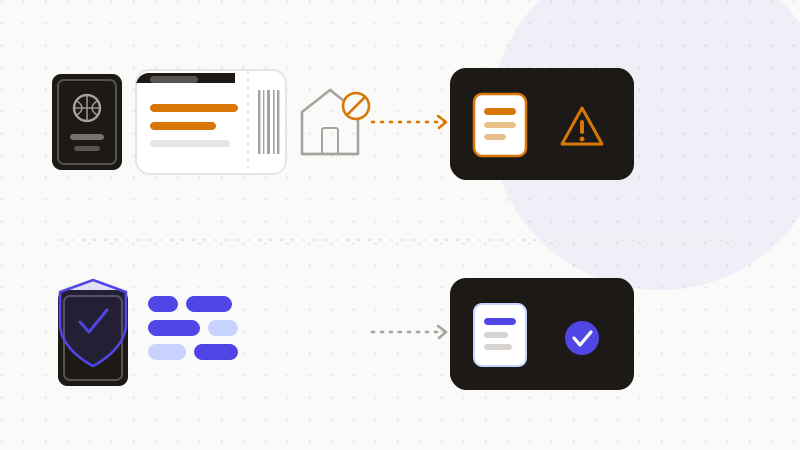
When you really must include a real detail, anonymise it first. Replace each sensitive value with a token. The AI reasons about the shape of your trip, without ever seeing the real values. You restore the real values afterwards, locally.
- 1Spot the sensitive data: passport, PNR, address, dates away, names.
- 2Replace them with reversible tokens, in the browser.
- 3Send only the anonymized text to the AI.
- 4Restore the real values in the reply, locally.
That's what ONYRI Sanitize is for. The engine detects sensitive data — passport number, PNR, address, dates — and replaces it with reversible tokens before sending. Detection and the mapping stay in your browser. Only anonymized text reaches the model. The AI finds only tokens, never your passport or your booking. You get the travel help, without the risk of identity theft, booking hijack or burglary.
Frequently asked questions
- Is it safe to use AI to plan travel?
- Yes for planning, no with your real data. AI can build an itinerary or suggest a city with no personal data at all. But never paste your passport number, your PNR, your address or your exact dates away into a consumer AI. The FTC lists a passport among the documents identity thieves target, and a PNR works like a password. Anonymise before you send.
- Why shouldn't I paste my booking reference (PNR) into an AI?
- Because a PNR is a key, not a harmless code. Researchers reported by Kaspersky (33C3) showed that your surname plus a 6-character code is often enough to view or change a booking on many sites. An attacker could see your passport data, cancel the ticket or change the passenger. Never post it and never paste it into a chatbot.
- How is my itinerary sensitive data?
- A full itinerary reveals the exact dates your home will be empty. Combined with your address, which often sits on a confirmation, it becomes a burglary roadmap. For a solo or vulnerable traveller, sharing a real-time location is also a safety risk. Keep your dates away offline and plan in the abstract.
Sources & references
- What To Know About Identity Theft (identity theft, passport among targeted documents, give out numbers only when necessary) — US Federal Trade Commission (Consumer Advice)
- Insecure flight booking systems, 33C3 research (surname + 6-character PNR authenticate, PNR as password, ~90% of reservations) — Kaspersky
- Location data (location data is personal data to be minimised, redacted or anonymised) — UK Information Commissioner's Office (ICO)
Keep your sensitive data in your browser
ONYRI Sanitize detects and masks your sensitive data before it reaches the AI, then restores the answer — from names to API keys.