Is It Safe to Paste Code Into AI? (Secrets, IP, Client Data)
Yes, once you strip the secrets. Code hides API keys and cloud credentials — remove them before pasting into ChatGPT, Claude or Gemini.
The short answer: pasting code into AI is useful, but risky if you skip one step. AI coding help is real. Yet source code carries three hidden payloads, beyond the logic you want fixed. First, secrets: hardcoded API keys, cloud credentials, database passwords, tokens, private keys. Second, proprietary logic your company hasn't shipped yet. Third, sometimes real customer data, hiding in comments, fixtures or test files. Paste all of that into a consumer AI, and it may be retained, reviewed by a human, or used to train a model. The fix is simple: strip the secrets and identifiers before the code leaves your machine.
Three things hide inside your code
Code is more than logic. It often carries very real values. Secrets are the sharpest of them. Here are the types most often left hardcoded inside code.
- API keys and access tokens (OpenAI, Stripe, Slack, GitHub, GitLab).
- Cloud credentials for AWS, Google Cloud or Azure.
- Database passwords and connection strings.
- Private keys and JWTs (signed session tokens).
How common are hardcoded secrets
Hardcoded secrets are very common. GitGuardian scans public code for leaked credentials. Its State of Secrets Sprawl 2024 report shows the scale. It found more than 12.7 million new secrets exposed in public GitHub commits during 2023. That was a 28% jump over the prior year. Roughly 1 in 10 commit authors leaked a credential that year. And about 7 of every 1,000 commits held at least one secret.
One detail stands out for AI users. GitGuardian recorded a roughly 1,212x year-over-year surge in leaked OpenAI API keys. They became the single most-detected secret type. These are public GitHub leaks, not secrets measured inside AI tools. But the inference is hard to dodge. The same hardcoded keys sitting in code are the ones people paste into a chatbot.
The Samsung lesson
The best-known case is Samsung. In 2023, engineers in its semiconductor division reportedly pasted confidential material into ChatGPT. That included source code and internal notes. It happened across several incidents, within weeks of the tool being allowed. Bloomberg broke the story, and CNBC reported it too.
Samsung then moved to restrict generative AI on company devices. The worry was structural, not a public breach. Anything typed into an outside service could be stored on third-party servers. And it could be hard to retrieve or delete later. No leak to the public was reported. The risk was retention beyond the company's control.
What OWASP says
Security standards bodies take this seriously. OWASP is a nonprofit that sets widely used software-security standards. It maintains a Top 10 for LLM Applications. On that list, 'Sensitive Information Disclosure' (LLM06) is a named risk. OWASP frames it as confidential or proprietary information surfacing through an LLM system. It warns this can bring legal consequences or lost competitive advantage. The lesson applies first to what you feed the model.
| Hidden payload | What it can expose |
|---|---|
| Secrets | API keys, cloud credentials, passwords, tokens, private keys, JWTs |
| Proprietary IP | Unreleased logic and trade secrets your company hasn't shipped |
| Customer data | Real personal data in comments, fixtures, logs, seed or test files |
The fix: anonymize before you paste
Here's the good part. You don't have to stop using AI on your code. You just remove what shouldn't travel. Ask your question about the logic, the bug, the pattern. Keep the live secrets and identifiers out of the paste. The model helps just as well without them.
- 1Scan the snippet for secrets: keys, tokens, passwords, private keys.
- 2Replace each one with a reversible token, in the browser.
- 3Paste only the anonymized code into the AI.
- 4Restore the real values in the answer, locally.
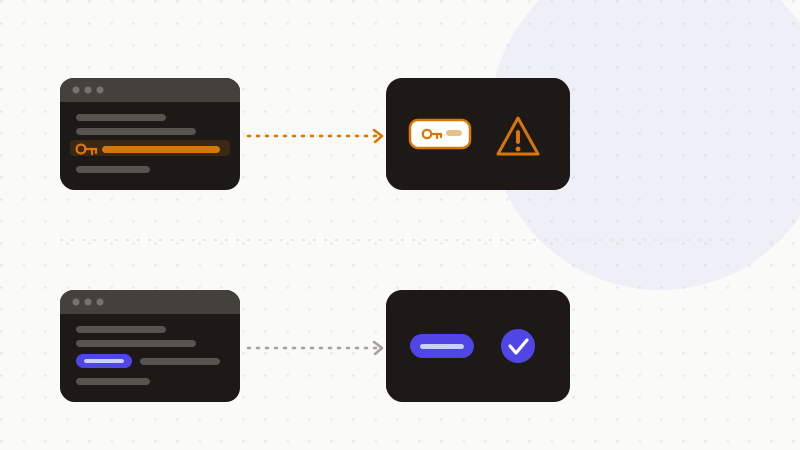
This works because most secrets follow patterns. An AWS key, a GitHub token, a Stripe key, a JWT — each has a recognisable shape. A detector can catch them before you hit send. That's the difference between useful AI help and an accidental leak.
That's what ONYRI Sanitize does. The engine detects cloud keys and tokens — AWS, GitHub, GitLab, Stripe, OpenAI, Anthropic, GCP, Azure, Slack, JWT — right in your browser. It replaces them with reversible tokens before anything is sent. Detection and the mapping stay client-side. Only anonymized code reaches the model. The AI sees tokens, never your live secrets. You get the debugging help, without the risk that made Samsung pull back and that OWASP names.
Frequently asked questions
- Is it safe to paste code into AI?
- It's useful, but only safe once you strip the secrets. Source code often hides API keys, cloud credentials, passwords and tokens. A consumer AI may retain, review or train on what you paste, depending on the product and its settings. So remove or tokenize secrets and identifiers before you send. Then the AI can help with your logic and bugs safely.
- What secrets hide in source code?
- Plenty. Hardcoded API keys, cloud credentials for AWS, GCP or Azure, database passwords, access tokens, private keys and JWTs. GitGuardian found more than 12.7 million new secrets in public GitHub commits in 2023. Leaked OpenAI keys surged the most. The same kinds of secrets sit in code that people paste into AI tools.
- Can AI still help if I remove the secrets?
- Yes. The model reasons about your code's structure, not the literal key value. Replace each secret with a reversible token, ask your question, then restore the real values locally. You get the same debugging help, and no live credential ever leaves your machine.
Sources & references
- Samsung restricts ChatGPT-style AI after a code-leak concern (staff pasted confidential material into ChatGPT) — CNBC
- State of Secrets Sprawl 2024 (12.7 million new secrets in public GitHub commits in 2023, +28% year over year) — GitGuardian
- OWASP Top 10 for LLM Applications (Sensitive Information Disclosure, LLM06) — OWASP
Keep your sensitive data in your browser
ONYRI Sanitize detects and masks your sensitive data before it reaches the AI, then restores the answer — from names to API keys.