Kann man einen Screenshot in ChatGPT einfügen?
Ja, eine KI kann einen Screenshot lesen. Aber das Bild zeigt oft mehr, als Sie beabsichtigt haben: Daten Dritter, E-Mails, Dashboards. Kopieren Sie stattdessen den nützlichen Text.
Ja, Sie können ChatGPT einen Screenshot schicken: Eine multimodale KI kann ein Bild lesen. Aber hier kommt die entscheidende Nuance. Ein Screenshot enthält oft weit mehr als das, worauf Sie eigentlich abzielen. Ein ganzes Gespräch, ein Dashboard, eine E-Mail, eine Seitenleiste. Und vor allem Daten Dritter, die Sie nie teilen wollten: Namen, Adressen, im Hintergrund sichtbare Nummern. Die KI liest das gesamte Bild, nicht nur den nützlichen Bereich. Der sichere Reflex: Kopieren Sie den Text, den Sie brauchen, anonymisieren Sie ihn und lassen Sie das Bild beiseite.
Ein Screenshot zeigt mehr, als Sie anvisieren
Ein Screenshot friert den gesamten Bildschirm in einem genauen Augenblick ein. Sie zielen auf ein Detail. Das Bild aber trägt alles Übrige mit sich. Genau das ist das Problem. Hier ist, was ein einfacher Screenshot oft mitnimmt:
- Die Seitenleiste, die offenen Tabs und die Benachrichtigungen des Moments.
- Eine E-Mail, ein Gespräch oder ein Dashboard, das im Hintergrund geblieben ist.
- Daten Dritter: Name, Adresse, Telefonnummer oder Kennung eines Kollegen oder eines Kunden.
- Beträge oder Referenzen, die rund um den Bereich sichtbar sind, der Sie eigentlich interessiert.
Was aus einem Screenshot wird, sobald er an die KI gesendet wurde
Einmal gesendet, gelangt das Bild in die Verarbeitung des KI-Anbieters. Es kann gespeichert werden. Je nach Angebot kann es auch zur Verbesserung des Modells beitragen. Sie teilen dann, ohne es zu wollen, die Daten anderer Menschen. Laut der CNIL ist ein personenbezogenes Datum jede Information, die sich auf eine identifizierte oder identifizierbare Person bezieht. Der Name oder die Adresse eines Kunden gehören dazu. In einem beruflichen Rahmen fällt diese Weitergabe unter die DSGVO: Ihre Organisation ist der Verantwortliche, und Sie verarbeiten dabei personenbezogene Daten Dritter unter ihrer Verantwortung.
| Kriterium | Den nützlichen Text kopieren | Den ganzen Screenshot senden |
|---|---|---|
| Was die KI sieht | Die Passage, die Sie auswählen | Der ganze Bildschirm, Hintergrund inklusive |
| Daten Dritter | Vor dem Senden ausgesondert | Oft unbemerkt mitgeschleppt |
| Datenminimierung (DSGVO) | Gewahrt: nur das Nötigste | Durch den visuellen Kontext untergraben |
| ONYRI-Anonymisierung | Möglich: Text lässt sich anonymisieren | Außer Reichweite: ONYRI liest keine Pixel |
„Ich will nur, dass die KI eine Fehlermeldung liest“
Das ist der häufigste Fall und eine berechtigte Frage. Sie wollen Hilfe bei einem Bug. Dafür müssen Sie nicht den ganzen Bildschirm senden. Kopieren Sie den Text der Fehlermeldung, mehr nicht. Das Hintergrundbild, die Tabs und die benachbarten Fenster haben im Prompt nichts zu suchen. Und wenn dieser Text einen Pfad, eine Kennung oder einen Namen enthält, anonymisieren Sie ihn zuerst.
Die Lösung: den Text kopieren, nicht das Bild
Gute Nachricht: Sie können KI nutzen und dabei die Exposition Ihrer Daten verringern. Die Methode läuft auf ein paar einfache Reflexe hinaus.
- 1Kopieren Sie den nützlichen Text, statt einen Screenshot zu machen: die Nachricht, den Absatz, die Fehlermeldung.
- 2Lassen Sie diesen Text durch ONYRI laufen: Sensible Daten werden vor dem Senden zu Token.
- 3Fügen Sie das anonymisierte Ergebnis in die KI ein und stellen Sie beim Lesen die echten Werte wieder her.
- 4Wenn ein Bild wirklich unerlässlich ist, schneiden Sie die sensiblen Teile zuerst zu oder verpixeln Sie sie.
Ein wichtiger und ehrlicher Punkt. ONYRI anonymisiert den Text, den Sie einfügen, nicht die Pixel eines Bildes. Es maskiert keinen Screenshot. Deshalb bleibt das Kopieren des Textes der beste Weg. Ein Bild zuzuschneiden oder zu verpixeln ist Ihr Teil der Arbeit vor dem Senden.
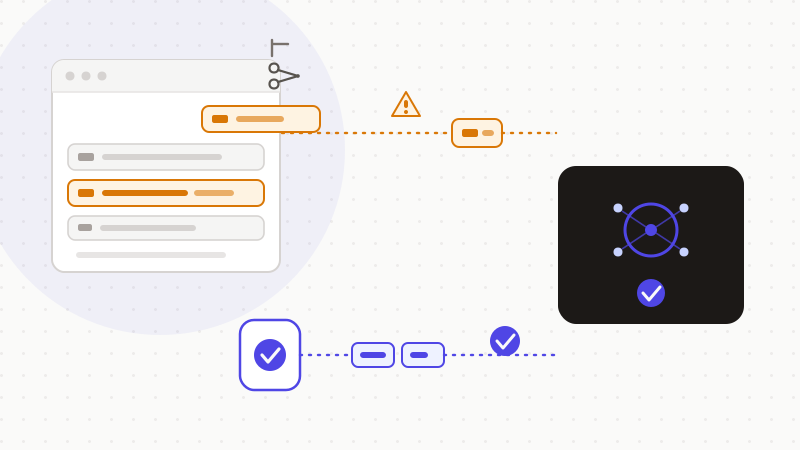
Genau das leistet ONYRI Sanitize. Die Engine erkennt sensible Daten in einem Text und ersetzt sie vor dem Senden durch umkehrbare Token. Die Erkennung und die Zuordnung Token↔Wert bleiben in Ihrem Browser. Nur anonymisierter Text erreicht die KI. Bei einem Bild bleibt die Regel dieselbe: Kopieren Sie den Text statt des Screenshots, oder schneiden Sie ihn vor dem Senden zu. Diese Datenminimierung verringert die Exposition Ihrer Daten; sie beseitigt sie nicht und deckt nicht jeden visuellen Kontext ab. Aber sie behält Ihnen die Kontrolle über das Wesentliche vor: Ihre echten Daten.
Häufig gestellte Fragen
- Kann man einen Screenshot in ChatGPT einfügen?
- Ja, eine multimodale KI kann einen Screenshot lesen. Aber das Bild zeigt oft mehr, als Sie beabsichtigt haben: Gespräche, E-Mails, Daten Dritter im Hintergrund. Die KI liest den ganzen Bildschirm, nicht nur den Bereich, auf den Sie gezielt haben. Der sichere Reflex: Kopieren Sie den nützlichen Text, anonymisieren Sie ihn und lassen Sie das Bild beiseite.
- Warum ist ein Screenshot ein Risiko für die Vertraulichkeit?
- Weil er alles Angezeigte mit sich trägt: Tabs, Benachrichtigungen, E-Mails und vor allem die Daten anderer Menschen (Name, Adresse, Telefonnummer). Indem Sie das Bild senden, teilen Sie womöglich Daten Dritter, ohne es zu wollen. In einem beruflichen Rahmen versetzt Sie das faktisch in die Rolle eines Verantwortlichen im Sinne der DSGVO.
- Kann ONYRI einen Screenshot anonymisieren?
- Nein, und man sollte dabei ehrlich sein. ONYRI anonymisiert den Text, den Sie einfügen, nicht die Pixel eines Bildes. Die gute Praxis: Kopieren Sie den nützlichen Text und anonymisieren Sie ihn mit ONYRI, statt das Bild zu senden. Wenn ein Bild wirklich unerlässlich ist, schneiden Sie die sensiblen Teile vor dem Senden zu oder verpixeln Sie sie.
Quellen & Referenzen
- Verantwortlicher und Auftragsverarbeiter: wie Sie Ihre Rolle richtig bestimmen — CNIL
- Definition: personenbezogene Daten (jede Information, die sich auf eine identifizierte oder identifizierbare Person bezieht) — CNIL
- Verordnung (EU) 2016/679 (DSGVO) — Artikel 5, Grundsätze für die Verarbeitung (Datenminimierung) — EUR-Lex (European Union)
Behalten Sie Ihre sensiblen Daten in Ihrem Browser
ONYRI Sanitize erkennt und maskiert Ihre sensiblen Daten, bevor sie die KI erreichen, und stellt anschließend die Antwort wieder her — vom Namen bis zum API-Schlüssel.