Are AI Keyboards Safe? What Your Phone Keyboard Sees
A keyboard sees every keystroke. On iOS it has no network access until you turn on Allow Full Access. Here is what that switch changes, and how to stay safe.
Most AI keyboards are safe by default — and the word doing all the work is “default”. On iOS, Apple runs a third-party keyboard in an isolated sandbox with no network access. Its developer documentation is explicit. Without Full Access, your keystrokes go only to the app you are typing into. Turn on “Allow Full Access”, and that guarantee ends. The keyboard can then send your keystrokes to a server. That is exactly how cloud AI writing help works. It is also how a keyboard called ai.type exposed data on about 31 million users in 2017. The rule fits in one line: know whether the switch is on, and know why.
A keyboard sees every keystroke — that is the job
A keyboard is the most privileged app on your phone. This is not a design flaw. It is the job. Every message passes through it. Every search too. Every password field. Every note you type into a banking app. Nothing else on the device sits in that position.
So the right question is never “does the keyboard see my text”. It always does. The real question is elsewhere. Can it send that text anywhere? On iOS, the answer comes down to one switch.
“Allow Full Access”: the switch that changes everything
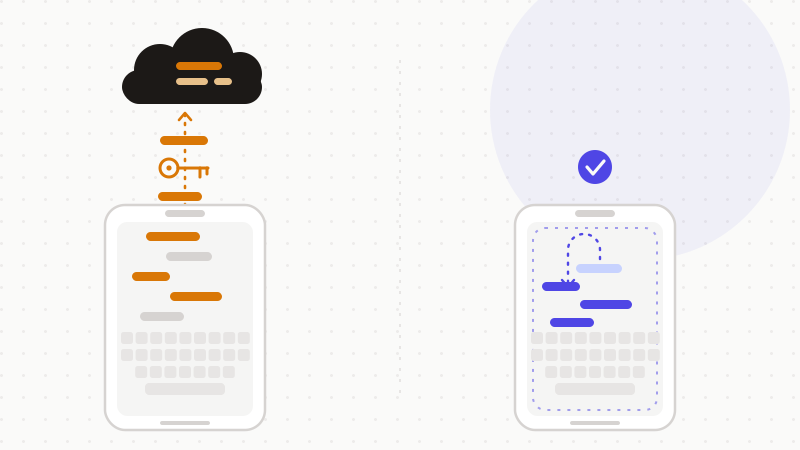
Apple's developer documentation describes the default with no ambiguity. A custom keyboard runs in an isolated, sandboxed process. Its default configuration blocks network access entirely. Apple states that keystrokes then go only to the app being typed into. They cannot be sent back to the developer's server. The keyboard still gets a lexicon of common words for autocorrect and suggestions. It gets no microphone. It gets no file system beyond its own container.
“Allow Full Access” is the setting that removes that guarantee. You find it in your iPhone's Settings. The developer opts in on the code side, through a flag named RequestsOpenAccess. Once you flip it, the keyboard gains real power.
- It can send your keystrokes and other input events to a server for processing.
- It can reach Location Services and your contacts, with your permission.
- It shares a container with its parent app.
- In plain terms: your keystrokes become available to the keyboard's developer.
Cloud or on-device: where AI changes the picture
On-device AI processes your text on the phone. Nothing is transmitted. Cloud AI is a different animal. Your text travels to a server, gets processed, then comes back. That trip is the whole risk. It does not exist in the first case.
Apple names the user expectation very plainly. People want their keystrokes to land in the field they are typing into. Not on a server. Not in an archive. Where a keyboard does send keystroke data to a server, Apple tells developers not to keep it. Long enough to return the text, or to deliver a feature the user was told about — and no longer.
That transmission surface is not theoretical. The Citizen Lab studied cloud-based pinyin keyboards from nine vendors in 2024. Eight of the nine had flaws letting a network eavesdropper recover keystrokes. Only one vendor used TLS, the transport encryption, properly. Researchers estimated up to a billion users could be affected. Their advice to users was direct: consider a keyboard that runs entirely on-device.
Mind the scope of that study. It looked at one specific family of keyboards, not the whole market. The lesson still travels. Cloud processing creates an exposure surface that local processing does not have.
What about password fields? The belief to correct
You often read that keyboards are locked out of password fields. Be careful with that one. Android's developer documentation says the opposite. An IME (input method editor, the technical name for a keyboard on Android) does receive password fields. Google documents the field variant an IME must handle. It tells developers to hide the password in the input view and in the suggestions. It also tells them not to store passwords on the device. Those are rules of conduct, not a wall.
Android says it out loud, too. When you enable a third-party keyboard, the system warns you. It tells you the input method may collect all the text you type. It names personal data such as passwords and credit card numbers. On iOS, Apple's verifiable guarantee is about the permission, not about field types. So trust the boundary you can check. That boundary is called Full Access.
ai.type, 2017: what a keyboard can leak
History gives us one very clean illustration. In December 2017, researchers at the Kromtech Security Center found a database left wide open. It belonged to ai.type, a then-popular third-party keyboard. No password protected it. Anyone who found it could read it.
| The ai.type exposure (2017) | What was found |
|---|---|
| The database | MongoDB-hosted, reachable with no password at all |
| The volume | Roughly 577GB of data |
| The people | About 31 million users |
| The data types | Email addresses, phone numbers, precise location, apps installed |
| The scraped contacts | A separate table of 374.6 million phone numbers |
| The reach | Roughly 40 million downloads on Google Play |
Two details deserve attention. The installed-apps list included banking and dating applications. And reporting noted that the no-subscription version collected more data than the paid one, to serve targeted advertising. Articles at the time also described a table of typed text. We stick to the figures we could confirm.
Under EU law, none of this is a grey area. The GDPR defines personal data in Article 4(1). It covers any information relating to an identified or identifiable person. The text names location data and online identifiers among those identifiers. Recital 30 adds that devices and applications supply identifiers of their own. Combined with other information reaching a server, they can profile and identify a person. The ai.type dump is exactly that scenario.
One honest caveat. ai.type is from 2017, and it is not news. Read it as a demonstration of the structural risk, not as a verdict on any keyboard sold today.
The right habits, in six moves
The checklist is short. And it has a rare merit: the platform vendors recommend it themselves.
- 1Prefer your phone's built-in keyboard. It is the default, and that is no accident.
- 2On iOS, open Settings > General > Keyboard. Check whether “Allow Full Access” is on, and ask what it buys you.
- 3Prefer a keyboard that processes text on-device. That is the Citizen Lab's own recommendation.
- 4Read the keyboard's privacy policy before you trust it. Look for what leaves the phone.
- 5Never type secrets into a keyboard you do not trust: passwords, card numbers, recovery codes.
- 6On a shared or work phone, stay on the stock keyboard.
The keyboard is the purest version of the problem ONYRI Sanitize addresses: text leaves the device to be processed by a model. Apple's architecture already makes the argument for us. No network by default, and a permission you must grant knowingly. ONYRI Sanitize preserves that boundary when you do use a cloud model. The engine detects sensitive data in your browser and replaces it with reversible tokens. Only anonymized text reaches the model. The mapping never leaves your machine. You get the AI help, and your secrets stay yours.
Frequently asked questions
- Are AI keyboards safe?
- By default, yes — and the default is what counts. On iOS, Apple runs a third-party keyboard in a sandbox with no network access. Without “Allow Full Access”, your keystrokes go only to the app you are typing into. Turn that setting on, and the keyboard can send your keystrokes to a server. So the real test is not the keyboard's brand. It is whether the switch is on, and whether the AI runs in the cloud or on the device.
- What does “Allow Full Access” actually do?
- It lifts the keyboard's isolation guarantee. Per Apple's documentation, a keyboard with open access can send your keystrokes and other input events to a server for processing. It can also reach Location Services and your contacts, with your permission, and share a container with its parent app. Apple warns in its own documentation that this should not be enabled lightly, because keyboards handle some of the most sensitive user data.
- Can a phone keyboard see my passwords?
- On Android, Google's documentation confirms that an IME does receive password fields. It tells developers to hide the password and not to store it — those are rules of conduct, not a technical block. The system also warns you that a third-party keyboard may collect everything you type, passwords and card numbers included. On iOS, the verifiable protection is the Full Access permission, not the field type. Never type a secret into a keyboard you do not know.
Sources & references
- Configuring open access for a custom keyboard (the “Allow Full Access” switch, what it unlocks, and Apple's warning that keyboards handle some of the most sensitive user data) — Apple Developer Documentation
- The 2017 ai.type incident: an unsecured, password-free database of roughly 577GB exposing data on about 31 million users, found by the Kromtech Security Center — Bitdefender (HotForSecurity)
- Regulation (EU) 2016/679 (GDPR) — Article 4(1) defining personal data to include location data and online identifiers, plus Recital 30 on device-supplied identifiers — EUR-Lex (Publications Office of the European Union)
Keep your sensitive data in your browser
ONYRI Sanitize detects and masks your sensitive data before it reaches the AI, then restores the answer — from names to API keys.