Are AI Browsers Safe? (ChatGPT Atlas, Perplexity Comet)
AI browsers like ChatGPT Atlas and Comet can be hijacked: researchers have shown prompt-injection attacks hidden inside ordinary web pages.
It depends on what you let them see. AI browsers like ChatGPT Atlas (OpenAI, launched October 2025) and Comet (Perplexity) are “agentic.” They browse the web, read your pages and act on your behalf. To do that, they run with your privileges, inside your already-logged-in sessions. The catch: security researchers have hijacked them. A booby-trapped page can hand them hidden orders. The real risk isn't one isolated bug. It's the nature of the whole category.
What an AI browser sees and does for you
An agentic AI browser doesn't just display pages. It acts. It can manage your inbox, fill forms, search for products and book tickets. To provide those services, it has to see the content of your pages.
And it sees them with your privileges. It operates inside your logged-in sessions. So it can reach your email, your bank and your internal tools, just like you would. That's where convenience becomes risk. The assistant has the same access you do, but it obeys text.
The researchers' warning: prompt injection
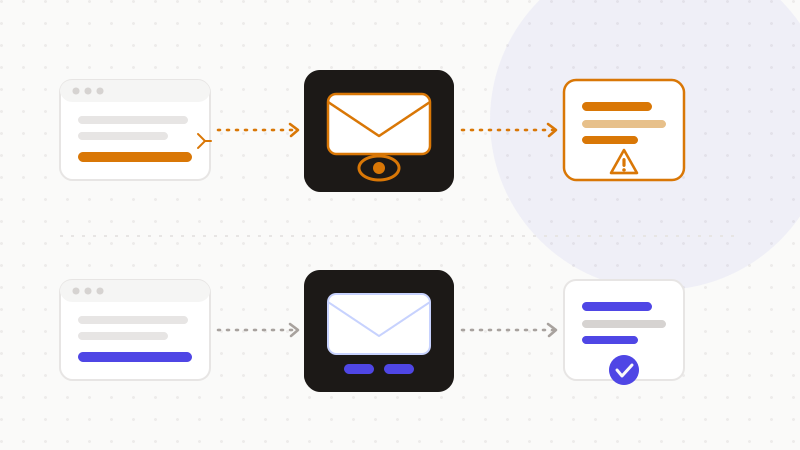
The central risk is called indirect prompt injection. The idea is simple. An attacker hides instructions inside an ordinary web page. For example, white text on a white background, or an HTML comment invisible to the eye. The AI browser reads those instructions. And it obeys them as if you had typed them.
Brave's security team proved this against Comet. In their proof of concept, hidden instructions on a page could drive the assistant. It could read the user's email, fetch a one-time password (OTP) from Gmail, then exfiltrate credentials. Actions that could reach a banking portal, a healthcare provider or corporate systems.
Brave's conclusion is blunt. Indirect prompt injection is not an isolated bug. It's a systemic challenge for the whole category of AI browsers. The web's classic rules no longer hold. The same-origin policy — the barrier that stops one site from acting on another — does not protect against agentic AI. New security architectures are needed.
OpenAI admits this publicly, and it's striking. The company says prompt injection is unlikely to ever be fully “solved.” Much like scams and social engineering on the web. It notes that Atlas's agent mode expands the attack surface. So it treats the issue as a long-term challenge, managed through continuous defenses, not a one-time fix.
Another case marked 2025: “CometJacking.” Researchers showed that a single crafted URL, in one click, could pass hidden instructions to Comet. The order: collect data from connected services like Gmail and Calendar, then send it to the attacker. Worse, encoding the data (for example in base64) could bypass Perplexity's exfiltration safeguards.
Memory and history: a second vector
Prompt injection isn't the only risk. The AI browser's memory is another. It's a data-exposure vector in its own right.
ChatGPT Atlas offers a “browser memories” feature, opt-in (off by default). It stores facts and insights drawn from your browsing — not the full content of pages. Atlas also gives a per-page control, “ChatGPT page visibility,” in the address bar. That lets you exclude a page from what the assistant sees and remembers.
These settings help. But they need care on every sensitive page. Independent testing has flagged weaker built-in protections in some AI browsers than in mainstream browsers. Caution is still warranted.
| You assume | The reality |
|---|---|
| “The AI just reads the page I'm on” | With your privileges, it can reach mail, bank, internal tools |
| “A link can't drive my AI” | One crafted URL hijacked Comet (CometJacking) |
| “Safeguards block exfiltration” | Encoding in base64 bypassed the protections in tests |
| “This will be fixed soon” | OpenAI says injection is unlikely to ever be 100% solved |
The fix: limit what the AI sees
The right instinct is simple. Limit what the AI browser can see on sensitive pages. An AI browser requests broad access: emails, calendar, contacts, history. The less you show it, the lower the risk.
Two practical rules. First, keep sensitive tasks — banking, email, health — in a separate conventional browser. Second, anonymize any content before you hand it to an AI. These two steps cover most of the scenarios the researchers described.
- Turn off agent mode on sensitive pages (banking, mail, health).
- Use the per-page control to hide a page from the assistant.
- Keep browsing memory off if you don't need it.
- Apply the same care to AI add-ons: see our guide on AI browser extensions.
- 1Spot the sensitive data in the text you hand to the AI.
- 2Replace it with reversible tokens in the browser.
- 3Send only the anonymized text to the model.
- 4Restore the real values in the reply, locally.
That's what ONYRI Sanitize is for. The engine detects sensitive data and replaces it with reversible tokens before sending. Detection and the mapping stay in your browser. Only anonymized text reaches the model. Even if content were hijacked along the way, it would find only tokens — not your real information.
Frequently asked questions
- Are AI browsers safe?
- It depends on what you let them see. Agentic AI browsers like ChatGPT Atlas and Comet read your pages and act with your privileges. Researchers (Brave in particular) have shown that a booby-trapped page can give them hidden orders — read an email, fetch an OTP, exfiltrate data. Limit what they see on sensitive pages and anonymize what you hand to the AI.
- What is prompt injection in an AI browser?
- An attacker hides instructions inside a web page (invisible text, an HTML comment). The AI browser reads and obeys them as if they were yours. Brave demonstrated this against Comet. OpenAI acknowledges the risk is unlikely to ever be fully solved and manages it through continuous defenses.
- How do I use an AI browser more safely?
- Three steps. Keep sensitive tasks (banking, email, health) in a separate conventional browser. Turn off agent mode and memory on those pages. And anonymize any content before handing it to the AI. An anonymization engine replaces sensitive data with reversible tokens. The model then never receives the real information.
Sources & references
- Agentic Browser Security: Indirect Prompt Injection in Perplexity Comet (proof of concept: email reading, OTP, exfiltration; systemic category risk) — Brave
- OpenAI says AI browsers may always be vulnerable to prompt injection attacks (admission: likely permanent risk, Atlas agent mode) — TechCrunch
- CometJacking: One Click Can Turn Perplexity's Comet AI Browser Into a Data Thief (crafted URL, Gmail/Calendar collection, base64 bypass) — The Hacker News
Keep your sensitive data in your browser
ONYRI Sanitize detects and masks your sensitive data before it reaches the AI, then restores the answer — from names to API keys.