Top 3 AI Privacy Mistakes to Avoid at Work
The worst AI privacy mistake at work isn't deleting a chat — it's trusting provider settings instead of removing sensitive data before you send. Top 3, ranked.
The most dangerous AI privacy mistake at work is simple. You trust the provider's settings instead of removing the sensitive data yourself. Deleting a chat feels safe. Pasting a whole file feels efficient. Neither is. Here are the three most common mistakes, ranked by severity. One fix neutralizes all three: strip the sensitive data before the prompt is ever sent.
The top 3 at a glance
Here is the ranking, worst first. Read the list, then the same three in a table.
- 1Trusting the provider's settings instead of removing sensitive data before you send. This is the number one mistake. No toggle makes pasted data private. The fix — strip the data before it leaves your browser — is what ONYRI Sanitize automates with reversible tokens.
- 2Pasting whole documents or client data into a chatbot to save time. It feels fast. It has already leaked source code, defect-detection code and a meeting recording at a major electronics maker.
- 3Believing that deleting a chat erases the data. A court order has already forced a provider to keep chats users had deleted or sent in temporary mode.
The table maps each mistake to why it hurts.
| Rank | Mistake | Why it's serious |
|---|---|---|
| 1 | Trusting settings instead of removing the data | No setting makes pasted data private; only removing it before you send holds. ONYRI Sanitize does this in the browser. |
| 2 | Pasting whole documents to save time | Confidential code and a meeting recording leaked this way; the company then restricted the tool. |
| 3 | Believing a deleted chat is erased | A preservation order forced a provider to keep deleted and temporary chats. |
The facts behind the ranking
Start with number three. Deleting a chat feels final. It isn't always. On 13 May 2025, a US preservation order landed in the New York Times v. OpenAI case. It forced OpenAI to keep ChatGPT output logs that are normally auto-deleted. The order explicitly covered chats users had deleted or sent in temporary mode. Judge Ona T. Wang issued it; Judge Sidney Stein affirmed it on 26 June 2025. The duty reached Free, Plus, Pro, Team and many API users. Enterprise, Edu and Zero Data Retention accounts were excluded. So for most people, whether a “deleted” chat is truly gone was out of their hands. We unpack this in our piece on why deleting a conversation doesn't erase it.
Number two is pasting to save time. It burns real companies. In three separate incidents within weeks, staff at Samsung Electronics fed internal material to ChatGPT. One paste was faulty internal source code. Another was code for spotting defective equipment. A third was a recording of a company meeting, turned into a document to draft minutes. After the leaks, Samsung restricted ChatGPT. It capped prompt uploads at 1024 bytes as a stopgap, then curtailed employee use. Cyberhaven's research on workplace data exposure shows how routine this has become. We cover the client-data version in our guide on putting customer data into ChatGPT.
Number one is the quiet one. You trust the settings and paste anyway. Here is why that fails. Consumer ChatGPT trains on your prompts by default. On personal Free, Plus and Pro accounts, the “Improve the model for everyone” setting is on unless you turn it off. Opting out only helps going forward. Once text enters the training set, it can't be pulled back. A VPN does not help here. It hides your IP and location, not the words you type. The provider still reads your prompt to answer it. Even with training off, a chat can sit up to about 30 days for moderation and legal reasons. Flagged chats can be read by human moderators. No toggle makes pasted sensitive data fully private. A paid plan won't change that by itself — we explain it in our note on whether paid AI plans train on your data.
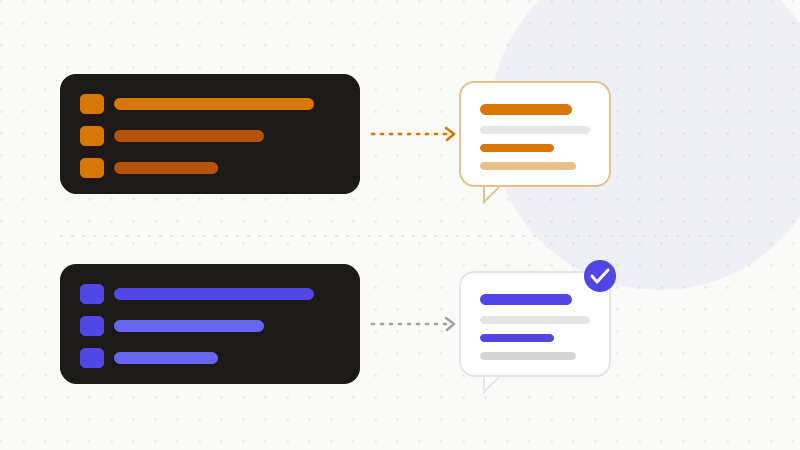
The one fix that neutralizes all three
There is a single move that answers every mistake above. Remove the sensitive data before the prompt leaves your machine. If the text holds no real names, numbers or secrets, deletion timing stops mattering. A retained log holds only tokens. A human moderator sees only tokens. A pasted file exposes nothing usable.
This is not a settings toggle. A toggle asks the provider to behave. Removing the data means the provider never receives it. That's why it holds across all three mistakes — court orders, careless pastes and default training alike.
How to put this to work
You can apply this today, in order of impact.
- Never paste a whole document. Send only the lines you truly need.
- Strip names, emails, client details and secrets before you hit send.
- Do the training opt-out too — good hygiene, just not a shield.
- For sensitive work at scale, treat every deletion as reversible by a court.
That's what ONYRI Sanitize does. The engine replaces sensitive data with reversible tokens before anything is sent. Detection and the token↔value mapping stay in your browser. Only anonymized text reaches the model. Whether a chat is retained, reviewed or subpoenaed later, it holds only tokens — never your real information.
Frequently asked questions
- What are the top AI privacy mistakes to avoid at work?
- Three stand out, in rising order of severity. Three: believing a deleted chat is erased — a court order has forced providers to keep deleted chats. Two: pasting whole documents or client data to save time. One: trusting the provider's settings instead of removing sensitive data before you send. The shared fix is to anonymize the prompt upstream.
- Does deleting a ChatGPT conversation really erase the data?
- Not always. A preservation order dated 13 May 2025 forced OpenAI to keep ChatGPT logs that are normally deleted. It came in the New York Times v. OpenAI case, and covered deleted and temporary chats. Enterprise accounts with a Zero Data Retention contract were excluded, but most consumer accounts were not.
- Does a VPN protect my AI prompts?
- No, not their content. A VPN hides your IP address and location, not the words you type. The provider still receives and reads your prompt to answer it. Only removing sensitive data before you send protects the content itself.
Sources & references
- OpenAI Court Order Forces Indefinite ChatGPT Data Retention (NYT copyright dispute) — The Cyber Express
- Samsung employees leaked corporate data in ChatGPT: report — CIO Dive
- ChatGPT Privacy Explained: Risks, Data Use, and Security Tips — Private Internet Access
Keep your sensitive data in your browser
ONYRI Sanitize detects and masks your sensitive data before it reaches the AI, then restores the answer — from names to API keys.