IA en journalisme : les règles de protection des sources
Oui pour rédiger et traduire, non avec la matière brute : anonymisez noms, lieux et fonctions avant tout appel à l'IA, et gardez les fuites hors du cloud.
Tout dépend de ce que vous collez. L'IA est sûre pour façonner un texte, traduire un document public ou expliquer un sujet. Elle ne l'est pas pour la matière brute. Une transcription d'entretien, un fichier fuité ou une note peuvent contenir les détails qui identifient une source confidentielle. Envoyée à une IA en ligne, cette matière quitte votre contrôle. La Freedom of the Press Foundation rappelle que le fournisseur peut en général accéder à ce que vous soumettez. Le contenu peut ressortir plus tard, par une demande judiciaire ou une fuite de données. La règle de la protection des sources est simple. Anonymisez les noms, les lieux, les fonctions et les identifiants avant tout appel à l'IA. Et gardez la matière la plus sensible hors du cloud.
Pourquoi la protection des sources change le calcul
La plupart des conseils de confidentialité parlent de vos propres données. Le journalisme, c'est autre chose. Les données appartiennent à quelqu'un qui vous a fait confiance. Une source peut perdre son emploi, son logement, parfois sa liberté. Ce risque ne disparaît pas parce qu'un outil est pratique.
Une transcription nomme rarement la source en toutes lettres. Ce n'est pas nécessaire. Un intitulé de poste, un site industriel, une date, un nom de projet interne : combinés, ces éléments ré-identifient une personne. Les guides de sécurité des rédactions appellent cela l'effet mosaïque. Le Digital Safety Kit du Committee to Protect Journalists (CPJ) documente cette hygiène de protection des sources depuis des années. L'IA générative ajoute simplement un nouvel endroit où la mosaïque peut atterrir.
Ce que dit la Freedom of the Press Foundation
La Freedom of the Press Foundation (FPF) est une organisation américaine à but non lucratif. Elle défend la liberté de la presse et anime une équipe de sécurité numérique pour les journalistes. Sa position sur les chatbots d'IA autonomes est directe. Un chatbot reste un service cloud ordinaire. Le fournisseur peut en général accéder à ce que vous soumettez. Il voit aussi des métadonnées : adresse IP, appareil, compte.
La FPF va plus loin sur l'entraînement. Le contenu envoyé peut servir à entraîner le modèle sous-jacent. Or, une fois qu'un modèle a appris quelque chose, un simple utilisateur n'a aucun moyen de le retirer. C'est pourquoi la FPF déconseille formellement de soumettre à une IA publique des détails identifiant une source, ou une conversation off the record.
- Désactivez les réglages d'entraînement et de partage de données partout où le produit le permet.
- Ne soumettez jamais à une IA publique des éléments identifiant une source ou une discussion off the record.
- Relisez tout ce que le modèle renvoie, liens compris, avant de l'utiliser.
- Pour la matière la plus sensible, faites tourner un modèle en local et hors ligne — la FPF cite des outils ouverts comme Ollama et GPT4All.
C'est déjà une routine — et c'est précisément le problème
Le Reuters Institute for the Study of Journalism, à l'université d'Oxford, a interrogé des journalistes britanniques sur l'IA. Les outils font déjà partie de la journée de travail. 56 % s'en servent au moins une fois par semaine. 27 % s'en servent tous les jours. Ces chiffres portent sur les journalistes du Royaume-Uni, pas sur la profession mondiale.
Regardez les usages. La transcription et le sous-titrage arrivent en tête (49 % au moins une fois par mois). Puis la traduction (33 %). Puis le secrétariat de rédaction (30 %). Ce sont exactement les tâches qui font entrer de l'audio brut, des notes brutes et des documents bruts dans un système tiers. L'exposition n'a rien de théorique. Elle est logée au cœur des usages les plus courants.
Les règles internes, elles, n'ont pas suivi. Dans la même étude, environ 60 % des journalistes déclarent que leur média a une politique IA. La vie privée et la sécurité des données figurent parmi les thèmes les plus couverts, autour de 43 %. Mais seul un tiers environ des organisations propose une vraie formation. Une règle sur le papier n'est pas un réflexe au clavier.
La surface juridique que personne n'avait prévue
Les régimes de protection du secret des sources ont été bâtis autour du matériel du journaliste. Les carnets. Les enregistrements. Le témoignage. Ces protections supposent que vous détenez la matière.
Un historique de conversation stocké chez un éditeur, c'est un autre combat. Il se trouve chez un tiers, sous ses conditions et sa juridiction. Le cadrage de la FPF est le plus sûr. Ce que vous confiez à un fournisseur d'IA peut ressortir. Par une demande judiciaire, ou par une fuite de données. Ne supposez pas que votre historique de chat bénéficie de la même protection que votre carnet. Supposez qu'il est atteignable.
Les conditions de rétention et d'entraînement varient aussi selon le produit et la formule. Grand public, API et entreprise ne suivent pas les mêmes règles. Ces conditions changent souvent. Vérifiez la politique de l'éditeur avant de lui confier quoi que ce soit de sensible.
La protection des données s'applique aussi au journalisme
L'Information Commissioner's Office (ICO) est le régulateur britannique de la protection des données. Son code de bonnes pratiques sur la protection des données et le journalisme est clair sur un point. L'exemption journalistique ne désactive pas la protection des données en bloc. La sécurité des données personnelles continue de s'appliquer. La minimisation des données aussi. Le code a été soumis au Secretary of State en juillet 2023 ; il doit achever son parcours statutaire avant d'entrer pleinement en vigueur.
Confrontez cela à votre flux de travail. Téléverser une transcription non caviardée chez un éditeur d'IA est un traitement de données. C'est aussi une décision de sécurité. La rédaction doit pouvoir la justifier. Envoyer moins de données reste la façon la plus simple de la justifier.
Documents hostiles et injection de prompt
Un second risque existe, dans l'autre sens. Les journalistes lisent des documents envoyés par des inconnus. Fuites. Tuyaux. Fichiers fournis par un adversaire. Un texte hostile peut être caché dans un document ou une page web. Il peut orienter un outil d'IA vers un mauvais comportement : affirmations fausses, liens de hameçonnage.
Restons mesurés sur l'ampleur. La FPF estime l'impact plutôt bien contenu sur un chatbot autonome et simple. Il grandit dès que l'outil peut naviguer, agir ou joindre d'autres systèmes. C'est précisément le montage agentique qu'utilisent les rédactions pour trier de gros lots de documents. Plus vous donnez de pouvoir à l'outil, plus vous devez surveiller ce qu'il lit.
| Ce que vous collez | Ce que cela peut révéler | Le bon réflexe |
|---|---|---|
| Une transcription d'entretien | Noms, employeur, fonction, lieu — de quoi ré-identifier une source | Remplacer les identifiants par des jetons réversibles avant l'envoi |
| Un document fuité ou sous embargo | Champs d'auteur, suivi des modifications, métadonnées embarquées | Nettoyer les métadonnées et caviarder, ou le garder hors du cloud |
| Les messages et coordonnées d'une source | La relation elle-même : qui vous a parlé, et quand | Ne jamais l'envoyer. Traiter en local, hors ligne |
| Un fichier hostile confié à un outil agentique | Des instructions cachées qui détournent le comportement de l'outil | Le lire dans un outil simple, sans navigation ; vérifier chaque retour |
La parade : anonymiser avant tout appel à l'IA
L'IA reste utile. Elle peut résumer une longue transcription. Elle peut traduire. Elle peut dégager des thèmes dans cent pages de notes. Rien de tout cela n'exige les vrais noms. Le geste juste consiste à retirer le détail identifiant d'abord, puis à le rétablir ensuite.
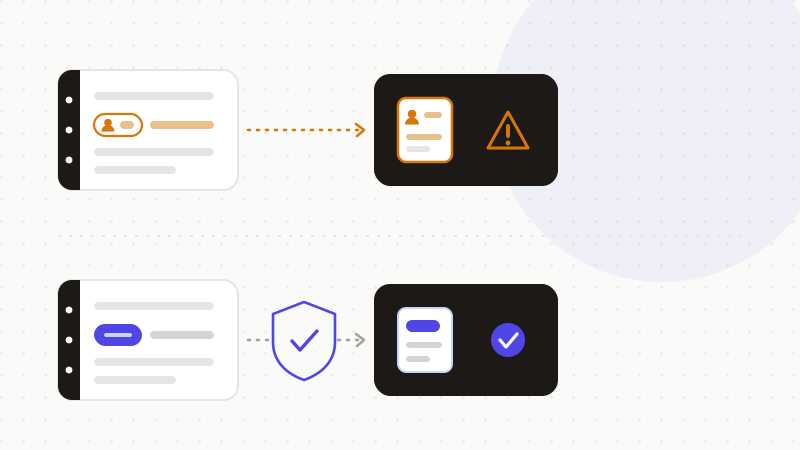
Ce sont les noms, les lieux, les employeurs, les fonctions, les dates et les identifiants internes qui ré-identifient une source. Remplacez-les par des marqueurs réversibles avant l'appel à l'IA. Gardez la table de correspondance sur votre machine. Restaurez les vraies valeurs dans la réponse, en local. Le modèle travaille sur la structure du récit, jamais sur la personne derrière.
- 1Listez les détails identifiants : noms, lieux, employeurs, fonctions, dates, codes internes.
- 2Remplacez chacun par un jeton réversible, dans votre navigateur ou sur votre machine.
- 3Vérifiez les réglages de rétention et d'entraînement de l'éditeur, et coupez l'entraînement si possible.
- 4N'envoyez à l'IA que le texte anonymisé.
- 5Restaurez les vraies valeurs dans la réponse, en local.
- 6Pour le cœur du sujet — échanges bruts avec la source, fuites non caviardées — utilisez un modèle local, ou aucune IA.
C'est le rôle d'ONYRI Sanitize. Le moteur tourne dans votre navigateur. Il détecte les détails identifiants dans vos notes et vos transcriptions, puis les remplace par des jetons réversibles. La correspondance entre le jeton et la vraie valeur ne quitte jamais votre machine. Seul un texte anonymisé atteint le modèle. Vous obtenez le résumé, la traduction, l'analyse. Votre source, elle, garde la protection que vous lui avez promise.
Questions fréquentes
- Peut-on utiliser l'IA en journalisme sans risque ?
- Oui pour les tâches qui ne touchent pas à la matière brute : rédiger, structurer, traduire du texte public, expliquer un sujet. Non pour une transcription d'entretien, une note ou un document fuité non caviardés. La Freedom of the Press Foundation rappelle qu'un chatbot reste un service cloud : le fournisseur peut accéder à ce que vous soumettez, et le contenu peut ressortir par une demande judiciaire ou une fuite. Anonymisez noms, lieux, fonctions et identifiants avant tout appel à l'IA.
- Puis-je coller une transcription d'entretien dans ChatGPT ?
- Pas telle quelle. Une transcription contient souvent de quoi ré-identifier une source : fonction, employeur, lieu, date, projet interne. La FPF déconseille de soumettre à une IA publique tout élément identifiant une source ou une conversation off the record. Remplacez ces détails par des jetons réversibles avant l'envoi, gardez la correspondance en local, puis restaurez les vraies valeurs dans la réponse.
- Mon historique de conversation avec une IA est-il protégé comme mes carnets ?
- Ne le supposez pas. Les régimes de protection des sources ont été pensés pour la matière que le journaliste détient : carnets, enregistrements, témoignage. Un historique stocké chez un éditeur d'IA est un autre combat, sous ses conditions et sa juridiction. La FPF le dit clairement : ce que vous confiez à un fournisseur peut être exposé par une demande judiciaire ou une fuite. L'hypothèse prudente est qu'il est atteignable.
Sources et références
- Using AI safely as a journalist : stand-alone AI tools (accès du fournisseur, entraînement, injection de prompt, modèles locaux) — Freedom of the Press Foundation
- AI adoption by UK journalists and their newsrooms (fréquence d'usage, tâches, politiques et formation) — Reuters Institute for the Study of Journalism (University of Oxford)
- Data protection and journalism : a code of practice (exemption journalistique, sécurité des données, minimisation) — PDF — UK Information Commissioner's Office (ICO)
Gardez vos données sensibles dans votre navigateur
ONYRI Sanitize détecte et masque vos données sensibles avant l'envoi à l'IA, puis restaure la réponse — du nom à la clé API.