Is It Safe to Put Your Email Address in AI?
Better not: your email is a master key. In a prompt, use a placeholder like [EMAIL] and add the real address yourself afterwards.
The short answer: better not paste it. Your email address looks like a harmless detail. It isn't. It's your login on almost every account you own. It's also how you recover your passwords. Whoever holds your address holds a thread to your whole digital life. Under the GDPR, it is personal data, not anonymous filler. Pasted into a consumer AI, it can be stored, reviewed and sometimes used to train the model. There is a clean method: ask your question, but swap the address for a token like [EMAIL] before you send.
Your email address is a master key
Think about how you log in. To your bank. To your social accounts. To your favourite online shop. The common thread is your email address. It acts as your username almost everywhere. And when you forget a password, where does the reset link land? In that same inbox.
That is why it matters so much. It is not just a mailbox. It is the recovery key to your other accounts. This reading is ONYRI's own, not a quote from any regulator. But it explains a simple fact. Whoever controls your address can often reset your passwords elsewhere.
The ICO, the UK's data protection regulator, confirms the legal side. An email address is personal data. It sits among the basic identifiers that can single someone out. So it is not a neutral detail to share lightly.
The same address links you everywhere
You probably reuse the same address across dozens of sites. It is convenient. It also makes you traceable. The ICO explains that a person can be identified indirectly. You only need to combine one piece of information with other data held elsewhere.
The ICO adds a key point. Even pseudonymised data still counts as personal data. Removing or replacing an identifier does not make it anonymous. A shared address works like a common thread. It ties your accounts together. That is exactly how data brokers and trackers build a profile of you.
A phishing, spam and account-takeover target
A leaked address invites targeted trouble. The first is phishing. The FTC, the US consumer protection agency, describes it clearly. Phishing messages impersonate a company or a person you know. The goal is to trick you into clicking a link or opening an attachment. They often use urgency or a threatened consequence.
The FTC offers one simple reflex. A legitimate company does not unexpectedly email you to click a link and update payment details. Do not reply. Do not click. Instead, contact the company using a phone number or website you know is genuine.
The second risk targets your accounts. The NCSC, the UK's cyber security authority, describes credential stuffing. Attackers feed lists of stolen username-and-password pairs into login forms automatically. They exploit one habit: reusing the same login across sites.
The maths is brutal. A leaked address, plus a password from a breach, can unlock other accounts. The NCSC recommends two defences. Turn on multi-factor authentication (MFA) wherever you can. Watch for unusual sign-ins: a location, IP address or browser that breaks your usual pattern.
- Targeted phishing: messages that impersonate a company you know to make you click.
- Spam and cold outreach: a leaked address ends up on resold lists.
- Credential stuffing: stolen logins replayed at scale against sign-in forms.
- Account takeover: your email is often the recovery key to your other accounts.
In a prompt, it travels and persists
Then there is the AI case. You ask: “write a signup message with my email”. Or: “format this contact list”. The address then travels to a third-party service. In a consumer AI, that text can be stored, reviewed by humans and, by default, used to improve the model. This point is ONYRI's read on common defaults, not a stance of the regulators cited here.
One case deserves extra care: other people's addresses. Pasting a contact list, or a colleague's address, shares a third party's personal data. Without their consent. Since an email address is personal data, this is a real concern under the GDPR. That is a reasonable inference from the ICO's definition, not a direct quote.
| You assume | The reality |
|---|---|
| “It's just a mailbox” | It's the login and password-recovery method for your accounts |
| “An email address isn't personal” | The ICO classes it as personal data, a basic identifier |
| “Reusing it everywhere is harmless” | That thread links your accounts and feeds your profile (ICO) |
| “Pasting a colleague's address is no big deal” | It shares a third party's personal data without consent |
The fix: keep the address out of the prompt
Good news: AI is still useful without your address. It can draft a signup message template. It can format a piece of text. For that, it needs no real address at all. Ask the question, then add the real value yourself, at the end.
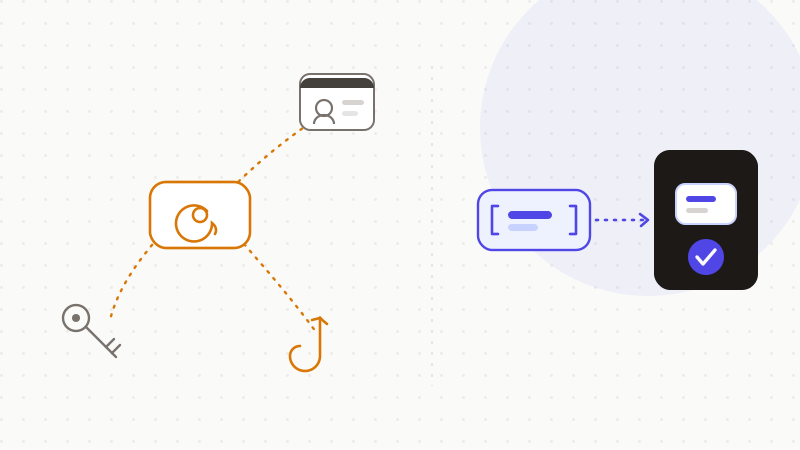
When you really must include a concrete example, anonymise it first. Replace the address with a token. The AI reasons about the shape of your request, without ever seeing the real value. You restore the real address afterwards, locally.
- 1Replace your address with a placeholder like [EMAIL].
- 2Use an alias or a masked address for signups.
- 3Never paste a contact list into a consumer AI.
- 4Add the real address yourself, after the reply.
That's what ONYRI Sanitize is for. The engine detects sensitive data — email addresses included — and replaces it with reversible tokens before sending. Detection and the mapping stay in your browser. Only anonymized text reaches the model. The AI finds only tokens, never your real address. You get the help, without exposing the master key to your accounts.
Frequently asked questions
- Is it safe to put your email address in AI?
- Better to avoid it. AI can draft a message or format text without your real address. Yet your email address is the login and password-recovery method for nearly all your accounts. Under the GDPR, it is personal data. Pasted into a consumer AI, it can be stored and reviewed. Replace it with a token like [EMAIL], then add the real value afterwards.
- Why is a leaked email address dangerous?
- Because it opens three doors. Phishing first: the FTC explains these messages impersonate a known company to make you click. Account takeover next: the NCSC describes credential stuffing, where an address plus a stolen password can unlock other accounts. Profiling last: the same address links your accounts together. Turn on two-factor authentication and keep the address out of prompts.
- Can I paste my work contact list into AI?
- No, avoid it. An email address is personal data, including other people's. Pasting a contact list shares third parties' personal data without their consent, a real concern under the GDPR. If you must process addresses, anonymise them before sending and restore the real values only locally.
Sources & references
- What is personal data? (an email address is personal data; indirect identification; pseudonymisation) — Information Commissioner's Office (ICO)
- How To Recognize and Avoid Phishing Scams (messages impersonate a known company; legitimate firms don't ask you to click) — US Federal Trade Commission (FTC)
- Use of credential stuffing tools (stolen credentials injected at scale; password reuse; MFA recommended) — UK National Cyber Security Centre (NCSC)
Keep your sensitive data in your browser
ONYRI Sanitize detects and masks your sensitive data before it reaches the AI, then restores the answer — from names to API keys.