Comment anonymiser vos prompts ChatGPT (pas à pas)
Pour anonymiser un prompt ChatGPT, remplacez chaque identifiant réel — noms, clés, montants — par un placeholder neutre avant de coller, puis restaurez.
Pour anonymiser un prompt ChatGPT, remplacez chaque identifiant réel par un placeholder neutre avant de coller. Remplacez les noms, e-mails, téléphones et adresses. Remplacez les noms de société et de client. Remplacez les montants, numéros d'identité et clés d'API. Remplacez le moindre détail médical. Utilisez une étiquette simple comme [CLIENT] ou [MONTANT]. Ensuite, réinjectez les vraies valeurs dans la réponse, de votre côté. À la main, c'est lent et facile à rater. Un outil de navigateur peut les détecter et les remplacer pour vous, puis les restaurer en local. Le modèle ne voit jamais que les placeholders.
Ce qui compte comme sensible dans un prompt
Avant de nettoyer un prompt, sachez quoi chercher. Les données sensibles vont par familles. Si une ligne peut remonter à une personne réelle, un accord réel ou un système réel, traitez-la comme sensible. Voici la checklist.
- Noms et contact : personnes, e-mails, téléphones, adresses postales.
- Financier : salaires, chiffre d'affaires, prix, coordonnées bancaires, montants de factures.
- Identifiants et clés : mots de passe, clés d'API, jetons, clés privées.
- Santé : diagnostics, pathologies, dossiers médicaux, arrêts maladie.
- Client et société : noms de clients, employeur, partenaires ou fournisseurs.
- Interne et stratégique : plans non publiés, termes d'un accord, URL internes, notes de réunion.
La méthode manuelle, avec des placeholders
Vous pouvez le faire à la main. L'idée est simple. Choisissez une étiquette par valeur et utilisez-la partout.
- 1Relisez votre brouillon et marquez chaque identifiant réel.
- 2Choisissez un placeholder clair pour chacun, comme [CLIENT] ou [MONTANT].
- 3Remplacez chaque occurrence d'une valeur par le même placeholder.
- 4Gardez une petite table privée étiquette → valeur réelle, de votre côté.
- 5Collez le prompt nettoyé dans ChatGPT.
- 6Quand la réponse arrive, réinsérez les vraies valeurs vous-même.
Ça marche, mais c'est fragile. Vous en oublierez — un nom au milieu d'une phrase, un chiffre dans un tableau. Vos étiquettes dérivent quand [CLIENT] devient [CUSTOMER] en cours de route. Le contexte peut fuir même sans les noms. Et ça ne tient pas au-delà de quelques prompts courts.
La méthode automatisée, côté navigateur
Un outil côté client fait le même travail, plus vite et plus régulièrement. Il tourne dans votre navigateur. Il scanne le texte et repère les zones sensibles. Il remplace chacune par un jeton réversible avant que le texte ne quitte votre appareil. ChatGPT ne voit jamais que les jetons. Quand la réponse revient, l'outil réinsère les vraies valeurs en local. La table ne quitte jamais votre navigateur.
Ce point compte, et les équipes sécurité y insistent. Le Top 10 OWASP pour les applications LLM classe la divulgation d'informations sensibles parmi les risques majeurs (LLM02 dans l'édition 2025, en hausse depuis la sixième place). Une voie est simple : la donnée était dans le prompt lui-même. Ce que vous ne mettez jamais dans la boîte ne peut pas ressortir plus tard par ce biais.
Un exemple avant / après
Voici un prompt court avec des données clairement fictives. À gauche, la version brute. À droite, le même prompt après tokenisation.
| Prompt brut (à ne pas envoyer) | Prompt nettoyé (sûr à envoyer) |
|---|---|
| Bonjour, je suis Jean Martin de ACME Corp. | Bonjour, je suis [NOM] de [SOCIÉTÉ]. |
| Appelez notre client au +33 6 12 34 56 78. | Appelez notre client au [TÉLÉPHONE]. |
| Notre perte du T3 atteint 480 000 euros. | Notre perte du T3 atteint [MONTANT]. |
| La clé de déploiement est sk-fake-9f2a7c00. | La clé de déploiement est [CLÉ_API]. |
Quand faut-il anonymiser ?
La règle est courte. Nettoyez toujours les données de travail, de client et de clientèle. Dans le doute, nettoyez. C'est la minimisation des données en pratique.
L'article 5(1)(c) du RGPD pose ce principe. Les données personnelles doivent être « adéquates, pertinentes et limitées à ce qui est nécessaire » pour la tâche. Appliqué à un prompt : n'envoyez au modèle que ce dont le travail a besoin. Retirez les identifiants dont il n'a pas besoin pour vous aider.
- Tout ce qui porte un nom de client — toujours.
- Documents de travail : contrats, factures, dossiers RH, code avec secrets.
- Tout ce que vous ne publieriez pas en public.
- En cas de doute — traitez-le comme sensible et nettoyez.
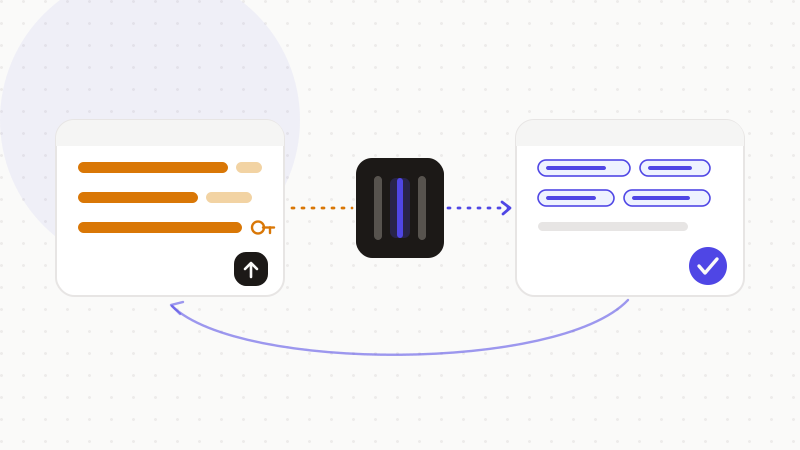
C'est le travail d'ONYRI Sanitize. La détection tourne dans votre navigateur, sur chaque famille sensible — noms, clés, montants, santé, données client et société. Chaque correspondance est remplacée par un jeton réversible avant l'envoi du prompt. La table reste sur votre appareil et ne transite jamais. ChatGPT ne voit que des jetons, jamais vos vraies valeurs. Vous obtenez la réponse, et l'outil restaure vos données en local. Pour la méthode plus large, au-delà de ChatGPT, voyez notre guide pilier sur l'anonymisation des données avant d'utiliser l'IA.
Questions fréquentes
- Comment anonymiser un prompt ChatGPT ?
- Remplacez chaque identifiant réel par un placeholder neutre avant de coller. Échangez noms, coordonnées, montants, noms de client et de société, numéros d'identité, clés d'API et détails médicaux contre des étiquettes comme [CLIENT] ou [MONTANT]. Gardez une petite table privée. Puis restaurez les vraies valeurs dans la réponse. Un outil côté client peut les détecter et les remplacer pour vous, et les réinsérer en local : le modèle ne voit que des jetons.
- Un placeholder équivaut-il à une donnée anonymisée ?
- Pas tout à fait. L'ICO britannique appelle anonymisation le fait de couper tout lien avec une personne. Échanger un nom contre [CLIENT] en gardant la table, c'est de la pseudonymisation. La table peut encore ré-identifier la personne, alors gardez-la privée. Elle réduit tout de même le risque porté par votre texte s'il fuit. Mais ne traitez pas la sortie comme une donnée légalement anonyme.
- Qu'est-ce qui compte comme sensible dans un prompt ?
- Six familles, en clair. Noms et coordonnées. Montants financiers. Identifiants et clés. Détails de santé. Noms de client et de société. Informations internes ou stratégiques. Si une ligne peut remonter à une personne, un accord ou un système réel, traitez-la comme sensible et remplacez-la avant l'envoi.
Sources et références
- Pseudonymisation : définitions et réduction du risque pour la protection des données — Information Commissioner's Office (ICO)
- RGPD article 5(1)(c) : le principe de minimisation des données — EUR-Lex (Office des publications de l'Union européenne)
- LLM02:2025 Divulgation d'informations sensibles (OWASP Top 10 pour les applications LLM) — OWASP GenAI Security Project
Gardez vos données sensibles dans votre navigateur
ONYRI Sanitize détecte et masque vos données sensibles avant l'envoi à l'IA, puis restaure la réponse — du nom à la clé API.