Can You Put a Client Invoice in ChatGPT?
Yes, but a client invoice often holds your client's personal data (name, address, SIREN). How to anonymize it before using AI.
Yes, technically nothing stops you — but it's not harmless. A client invoice very often contains personal data: your client's name, their address, sometimes their SIREN (French business registration number). It also carries sensitive commercial data: amounts, services, payment terms. If you are the data controller, pasting this document into a consumer AI exposes that data to a third party, outside your control. The cautious reflex: anonymize the identifying details before the prompt, then reinsert the real contact details yourself.
An invoice isn't “just a commercial document”
Many people think an invoice is “just a commercial document.” That's wrong as soon as your client is an identifiable individual. A sole trader, a self-employed person, a named contact: their name, address and SIREN point to a real person. The CNIL (France's data protection authority) defines personal data as any information relating to an identified or identifiable individual. Identification can be direct, through the name, or indirect, through the address or an identifier. Honest nuance: the purely generic contact details of a large company are not, in themselves, personal data according to the CNIL. But an invoice almost always reveals more than that.
- The client's full name if they are a sole trader, or their company name if it's a company — a mandatory item (service-public.gouv.fr).
- The client's address, also mandatory on the invoice.
- Increasingly, the client's SIREN number: a mention that is rising with the e-invoicing reform.
- The pre-tax and total amounts, the detailed services, and the intra-EU VAT number above 150 €.
What data does an invoice contain?
Here is how to read an invoice from a personal-data standpoint.
| Invoice element | Personal data? | Why |
|---|---|---|
| Client name / company name | Often yes | Direct if sole trader or named contact |
| Client address | Often yes | Indirect identification per the CNIL |
| Client SIREN number | Yes for a sole trader | Points to an identifiable individual |
| Amounts and services | Sensitive commercial data | Confidentiality owed to your client |
What you owe your client: confidentiality and GDPR
By issuing the invoice, you are the data controller for your client's data. The GDPR applies to every business, whatever its size — small and mid-size firms included. It sets two principles that matter here: minimization and security. To minimize is to process only the data that is truly necessary. Yet when you paste an invoice into a consumer AI, its content enters the provider's processing. That processing is outside your control. You also owe your client basic confidentiality over their contact details and your commercial exchanges.
The fix: anonymize the invoice before the prompt
Giving up AI isn't mandatory. You can keep the tool to draft, proofread, translate or prepare a payment reminder. You just never show it your client's real identity.
- 1Spot the identifying elements: client name, address, SIREN, sensitive amounts.
- 2Replace them with tokens, in the browser, with ONYRI. The real values never leave your device.
- 3Work on your text — reminder, translation, proofreading — on that anonymized template.
- 4Reinsert the real contact details yourself in the final document.
“But it's just to reword a payment reminder.” Perfect, that's the ideal case. Reword on an anonymized template, where the name and SIREN are already replaced. The AI improves the tone and the wording. You, and only you, then reinsert the real contact details.
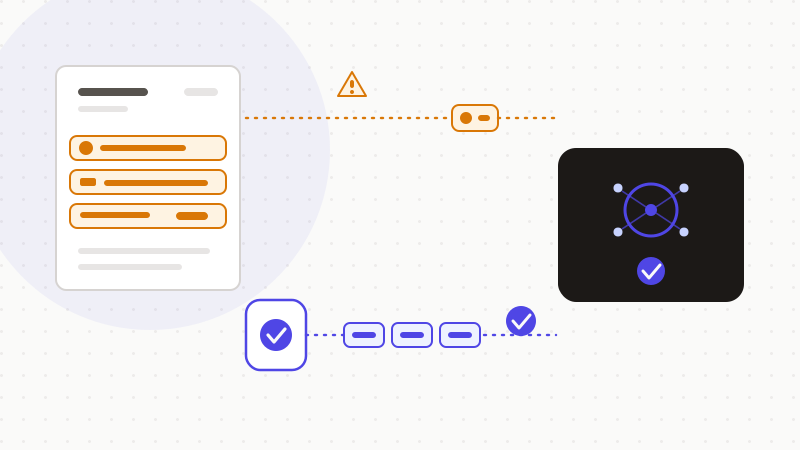
That's exactly what ONYRI Sanitize does. The engine spots the client's name, the address, the SIREN and the amounts, then replaces them with reversible tokens. Detection and the token↔value link stay in your browser. The AI only ever sees a neutralized invoice — never your client's real identity. This doesn't release you from your GDPR obligations, but it takes the sensitive data out of the equation.
Frequently asked questions
- Can you put a client invoice in ChatGPT?
- Technically yes, but be careful. An invoice often carries your client's personal data — name, address, sometimes SIREN — and sensitive commercial data. As the data controller, you expose that information to a third party, outside your control. The safe reflex: anonymize the identifiers before the prompt, then reinsert the real contact details yourself.
- Is my client's SIREN personal data?
- For a sole trader or self-employed person, yes: the SIREN points directly to an identifiable individual, per the CNIL definition. For a company with no link to a named person, a business identifier isn't, in itself, personal data. When in doubt, treat it as data to protect.
- Does anonymizing my invoice before AI make me GDPR-compliant?
- No, not on its own. Removing the name, address and SIREN supports the minimization principle and lowers the risk. But compliance also depends on your legal basis, on informing the people concerned, and on your other processing. Anonymization is a useful guardrail, not a verdict of compliance.
Sources & references
- Mandatory items on an invoice issued to a business client (client identification, address, amounts, VAT) — service-public.gouv.fr (DILA)
- Definition of personal data: direct or indirect identification of an individual — CNIL
- Applying the GDPR in a small or mid-size firm: the GDPR applies whatever the size, minimization and security — CNIL
Keep your sensitive data in your browser
ONYRI Sanitize detects and masks your sensitive data before it reaches the AI, then restores the answer — from names to API keys.
Anonymize my prompt